







Explore Nector Features
Explore Nector Features
Now that your loyalty program foundation is in place, it's time to unlock the full potential of Nector. This section guides you through Nector's advanced features, which help you create more engaging experiences, reward customers in creative ways, and gain valuable insights into program performance.
Let's explore how each feature can help you build stronger customer relationships and drive meaningful growth for your business.
Nector Reviews

Social proof is essential for any online business aiming to establish trust and credibility. Reviews serve as a powerful way for customers to share their genuine experiences with your products, helping potential buyers make confident purchasing decisions.
Nector's robust reviews feature makes it easy to collect, manage, and showcase customer feedback exactly where it matters most. You can strategically display reviews across multiple touchpoints to maximize their impact:
- Product Pages – Build confidence at the point of purchase with relevant product-specific reviews
- Homepage - Sticky Widget – Keep social proof visible as customers browse your site
- Homepage - Featured Reviews – Highlight your best testimonials to make a strong first impression
Reviews Widget
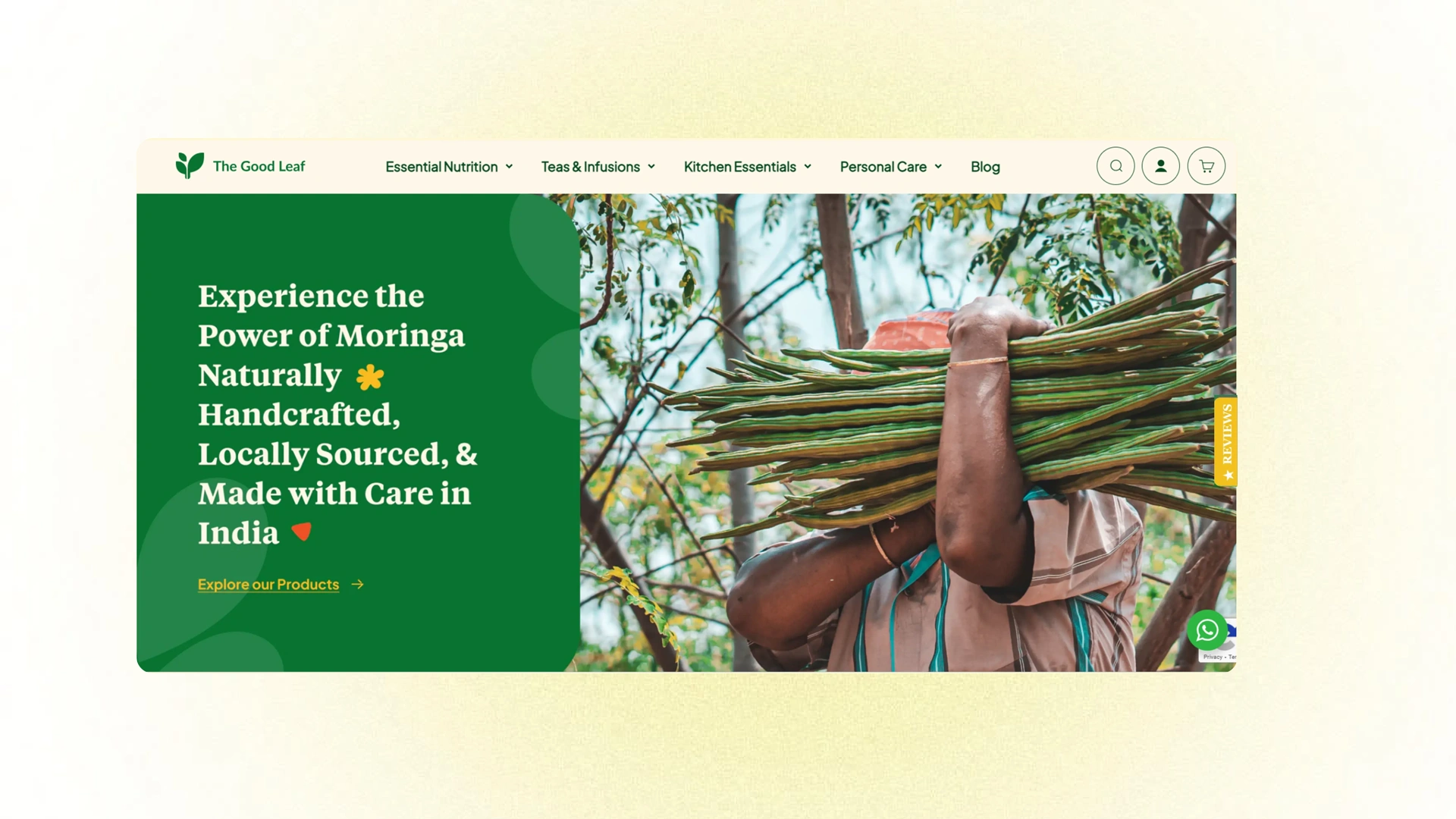
Make a strong first impression by showcasing your Reviews widget on your homepage. This feature lets you display customer testimonials prominently, demonstrating the trust you've earned and giving new visitors immediate confidence in your business. Remember, social proof can be your most persuasive selling point at first glance.
Featured Reviews
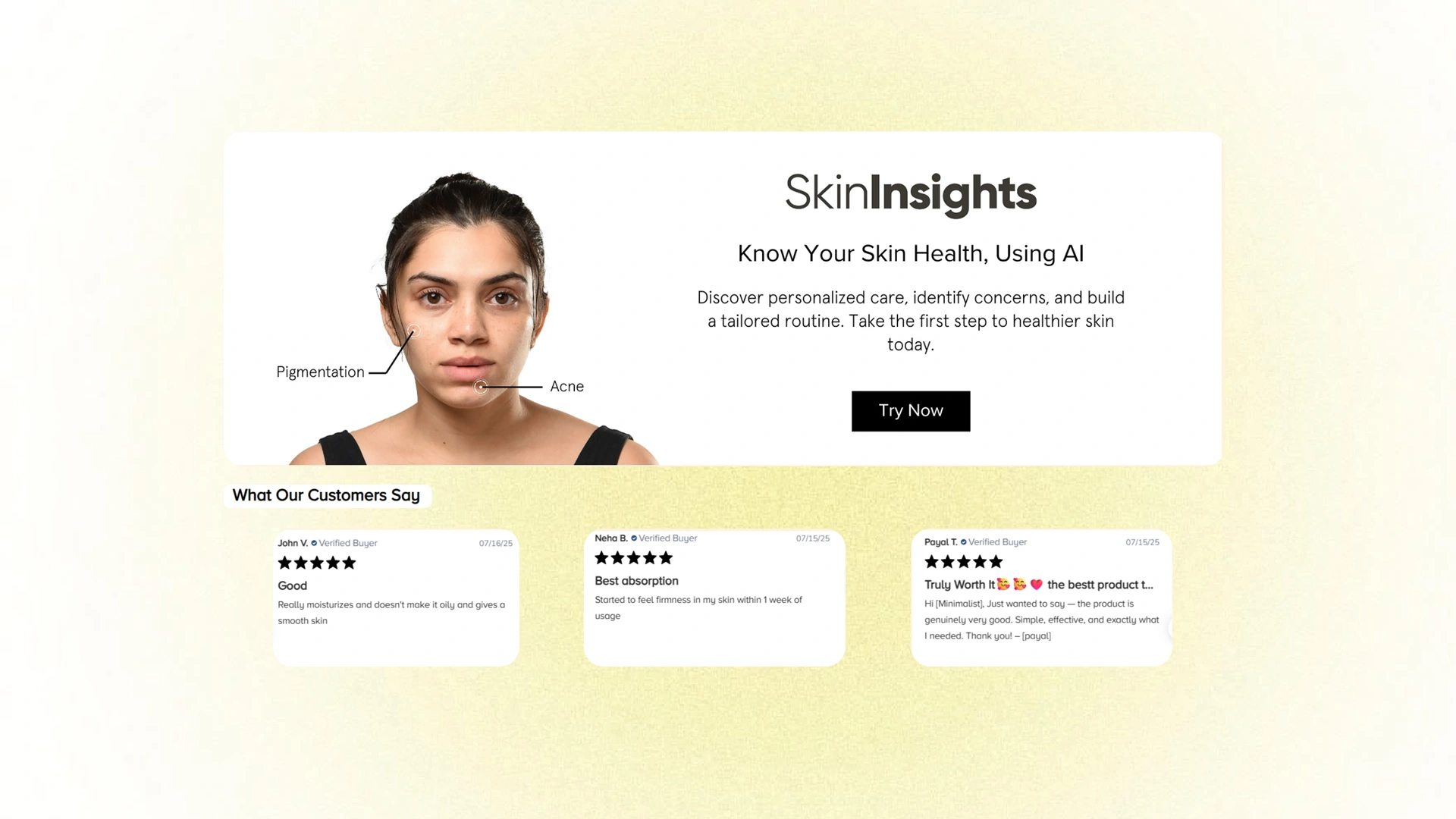
Showcase your best customer testimonials in style with Featured Reviews. This carousel feature lets you handpick and display your most impactful reviews on your homepage, creating an engaging visual experience that highlights what customers love most about your brand. Curate the feedback that matters and let your satisfied customers do the talking.
Google-Ready Ratings
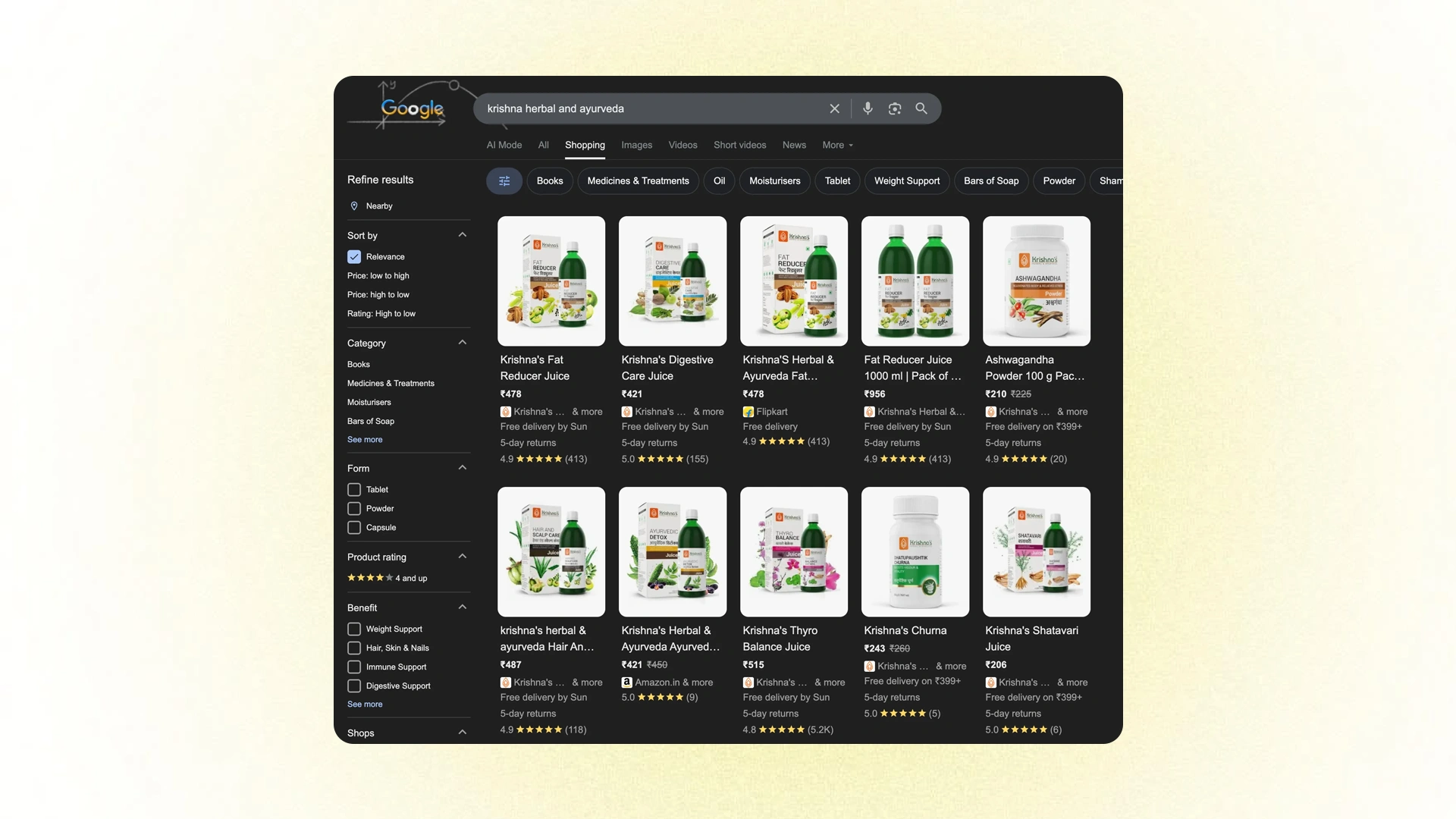
Take your social proof beyond your website and directly into Google Search results. Nector's Google-Ready Ratings feature exports your reviews as XML, enabling you to display authentic star ratings on Google Shopping and Search through Google Merchant Center.
How it Works
- Automatic Feed Generation – Nector automatically creates your review feed in Google's approved XML format, eliminating manual work and technical hassle.
- Seamless Merchant Center Integration – The feed syncs directly with your Google Merchant Center account, displaying verified star ratings on your product listings and search results.
- Enhanced Visibility & Trust – Live star ratings boost your brand's credibility, increase click-through rates, and help you stand out in competitive search results.
- Quick & Compliant Setup – Get up and running fast with a setup process that's fully compliant with Google's structured data requirements.
Turn your customer reviews into a powerful asset that drives traffic and builds trust right where shoppers are searching.
Dedicated Pages for Loyalty, Referral, and Reviews

While your loyalty widget serves as a convenient entry point for customers, you might worry that some visitors could overlook it. That's where dedicated pages come in—standalone pages on your website that showcase your loyalty program, referral initiative, and reviews in detail.
Nector makes it easy to create professional, on-brand pages that give your programs the visibility and explanation they deserve. These pages act as dedicated hubs where customers can learn about benefits, understand how to participate, and get inspired to engage.
What Makes a Great Dedicated Page
Here are some best practices we've seen work well:
- Brand-Aligned Naming – Choose a name that reflects your brand personality, like "Plant Parents Reward Club" instead of just "Loyalty Program." This creates a sense of community and belonging.
- Visual Appeal – Add a custom cover image that matches your brand aesthetic and makes the page feel polished and personalized.
- Clear Benefit Communication – Use the page content to highlight what customers gain from joining—whether it's exclusive rewards, early access, special perks, or VIP treatment.
By creating dedicated pages for your loyalty, referral, and review programs, you ensure that every visitor has the opportunity to discover and engage with the experiences that build long-term customer relationships.
Dedicated Reviews Page
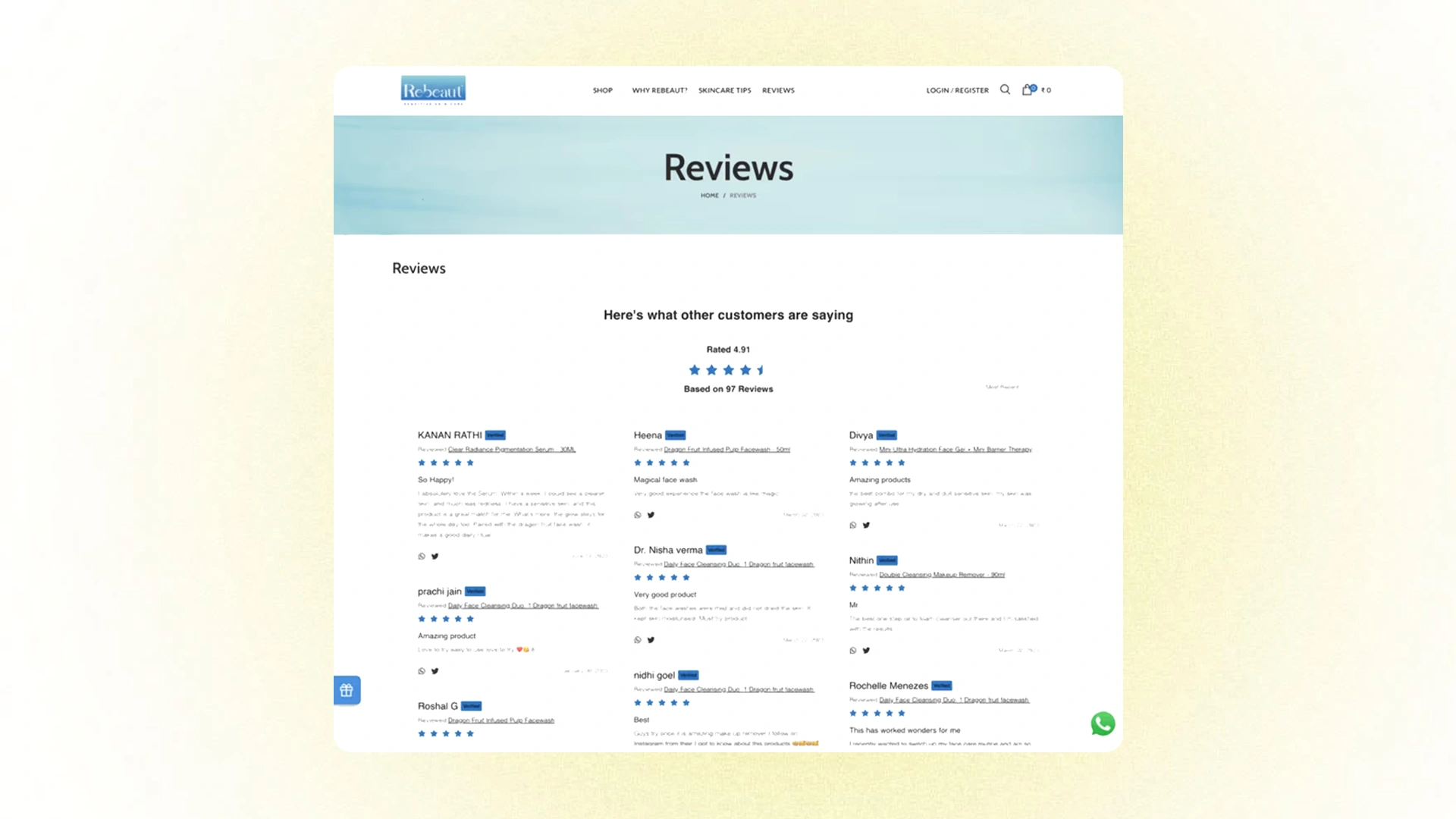
Bring all your customer reviews together in one powerful location. The Dedicated Reviews Page consolidates every testimonial you've collected, creating a comprehensive trust-building resource that visitors can explore. It's an easy way to showcase the full scope of positive customer experiences, improve discoverability, and demonstrate your commitment to transparency—all while boosting your site's SEO with valuable user-generated content.
Dedicated Referral Page
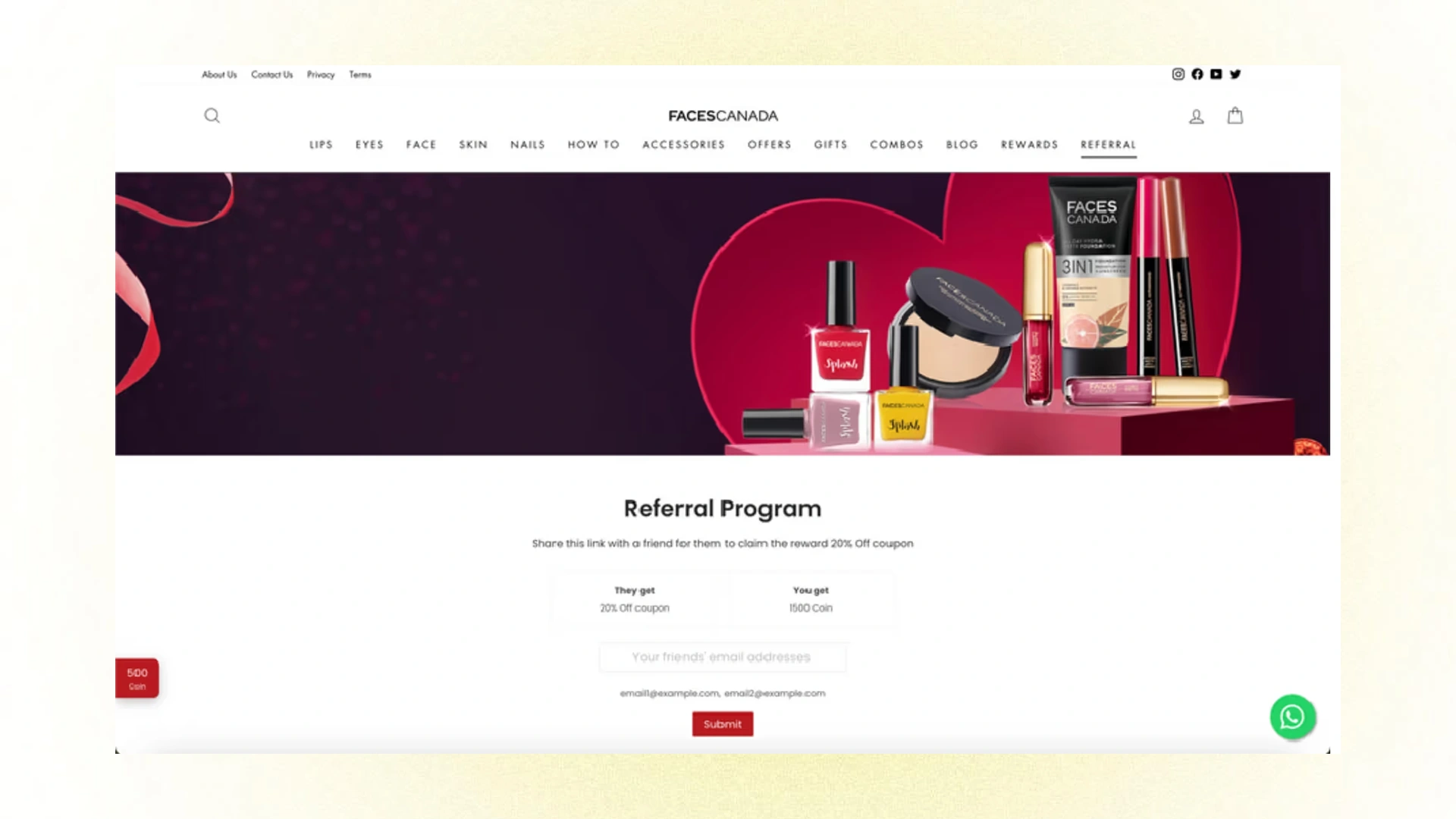
Give your referral program the spotlight it deserves with a Dedicated Referral Page. This page increases visibility and makes it incredibly easy for customers to understand how your program works, access their unique referral links, and start sharing. If referrals are part of your growth strategy, a dedicated page ensures customers can easily find, understand, and participate in spreading the word about your brand.
Tier-Based Rewards
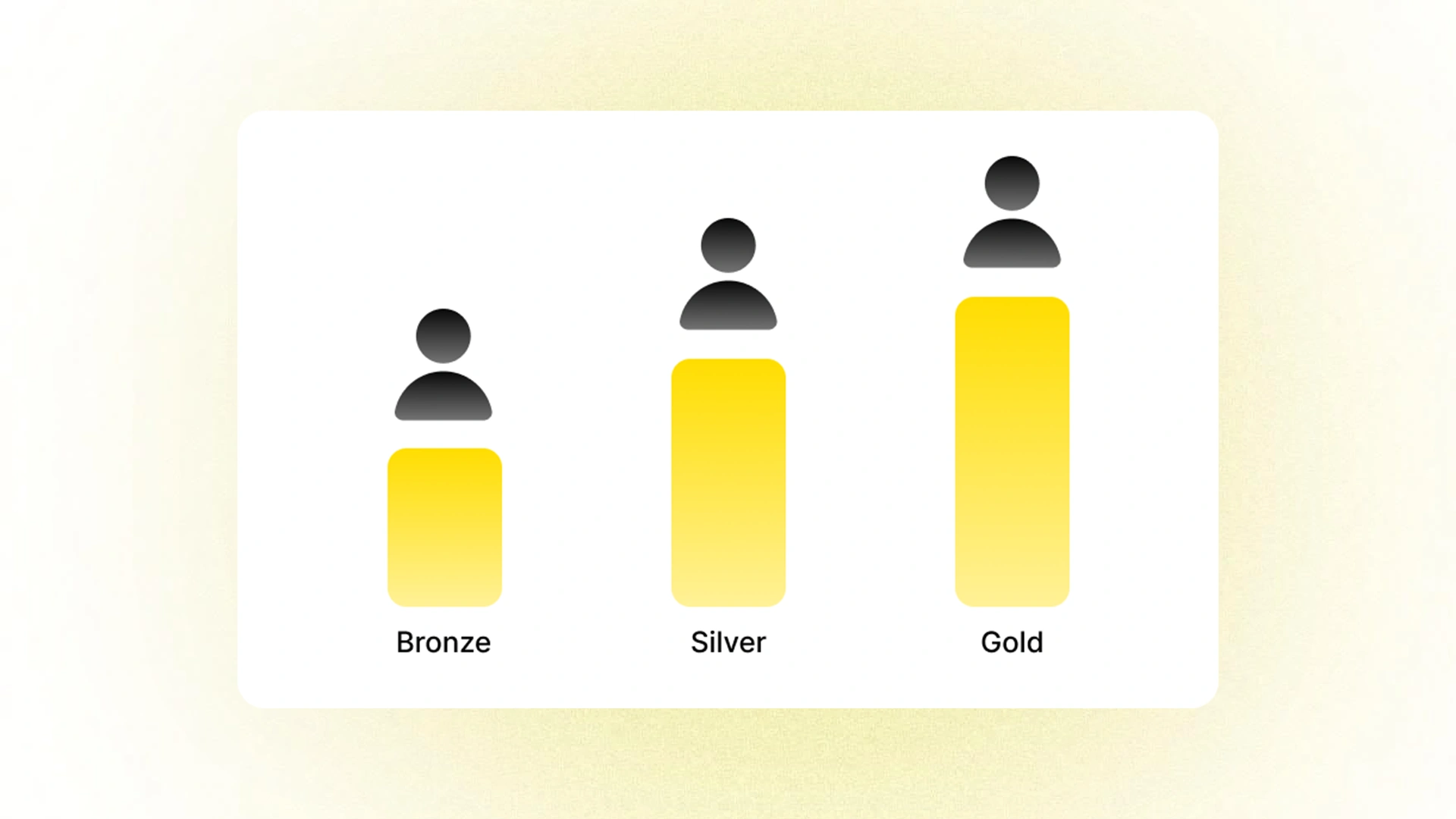
Recognize and reward your most valuable customers with Tier-Based Rewards. This powerful feature allows you to create exclusive VIP experiences that incentivize continued loyalty and make your best customers feel truly appreciated.
Nector gives you the flexibility to segment customers into different tiers based on their engagement and value to your business:
- Total Amount Spent – Reward high-value customers who invest the most in your brand
- Total Number of Orders – Recognize frequent shoppers who consistently choose your business
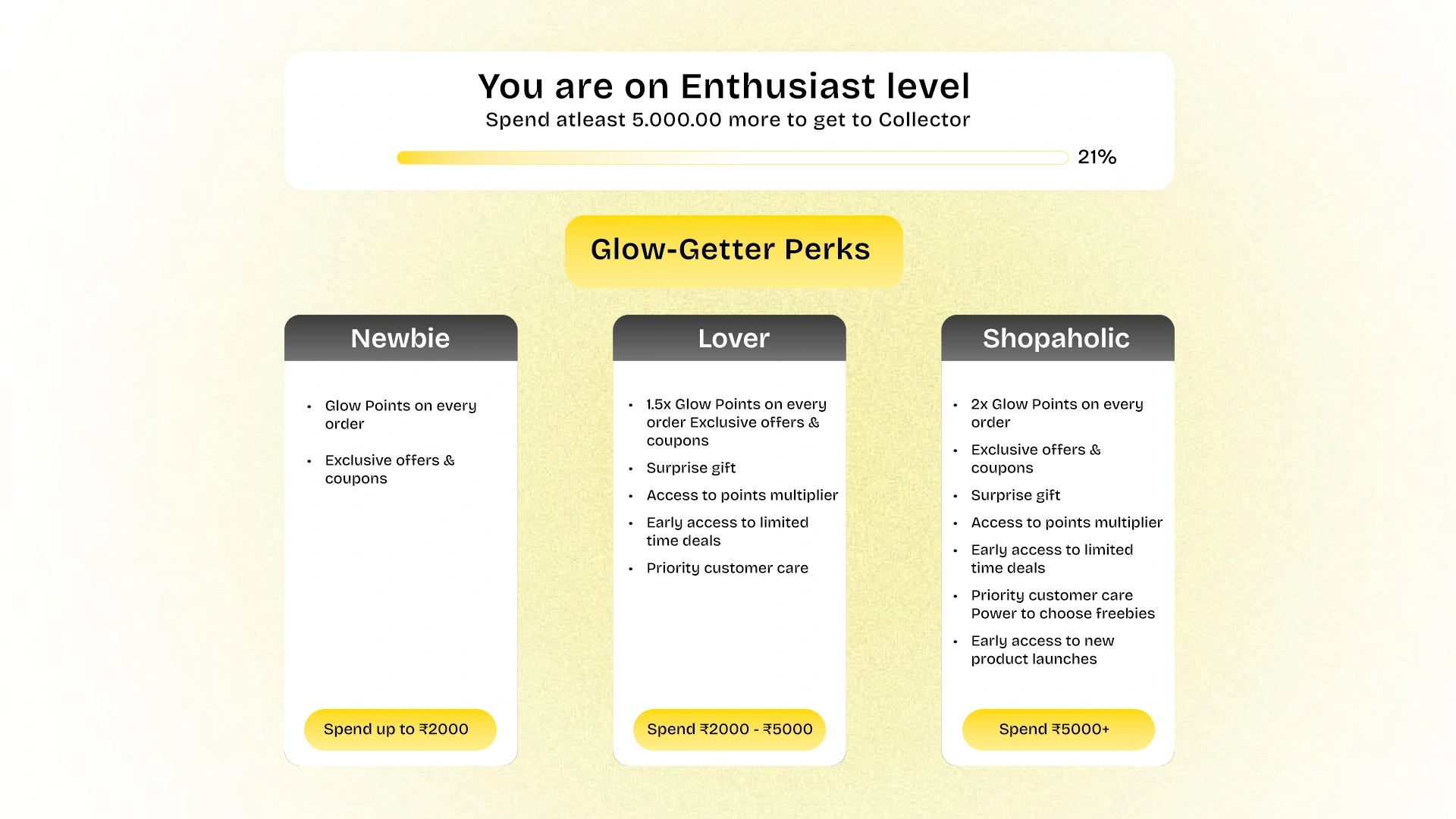
How It Works
- Create up to 5 Tiers – Build a progression system that motivates customers to reach the next level, such as Bronze, Silver, Gold, Platinum, and VIP.
- Define Custom Rules – Set the criteria for each tier based on spending thresholds or order counts that align with your business goals.
- Offer Exclusive Perks – Configure tier-specific benefits like enhanced discount percentages, early access to sales, free shipping, birthday bonuses, or special product releases.
Tier-based programs create a gamified experience that encourages customers to increase their engagement while making your most loyal advocates feel valued and special. It's a win-win strategy that drives retention and increases customer lifetime value.
Tier Performance Analytics: Tracking Health & Behavior
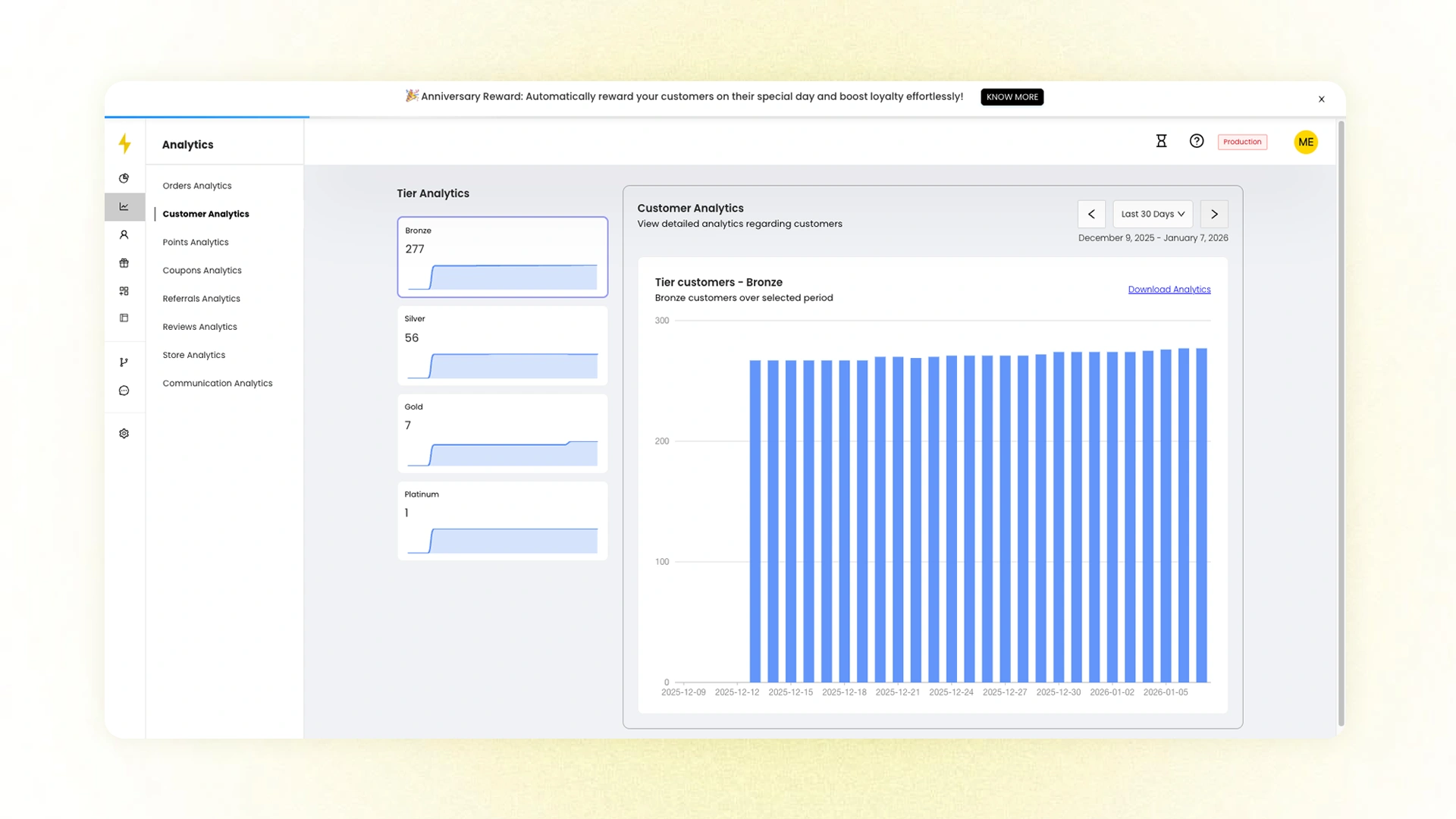
Understanding how your tiered loyalty program performs is crucial to optimizing it for maximum impact. Nector's Tier Performance Analytics gives you complete visibility into customer behavior across tiers, helping you make data-driven decisions that strengthen retention and drive growth.
Key Insights at Your Fingertips
- Real-Time Tier Distribution – See exactly how many customers are in each tier at any given time, helping you understand the health and balance of your program.
- Movement Tracking – Monitor daily and monthly tier transitions to identify which customers are progressing, stagnating, or moving backward through your tier structure.
- Churn & Expiry Analysis – Identify customers who drop tiers due to inactivity or tier expiry, allowing you to implement targeted re-engagement campaigns before you lose them.
- Growth Pattern Recognition – Spot trends in customer advancement to understand what behaviors and incentives are driving tier progression.
- With these actionable insights, you can refine tier requirements, adjust rewards, and create intervention strategies that keep customers engaged and moving upward. Turn analytics into action and build a loyalty program that continuously improves.
Progressive Cashback Rewards
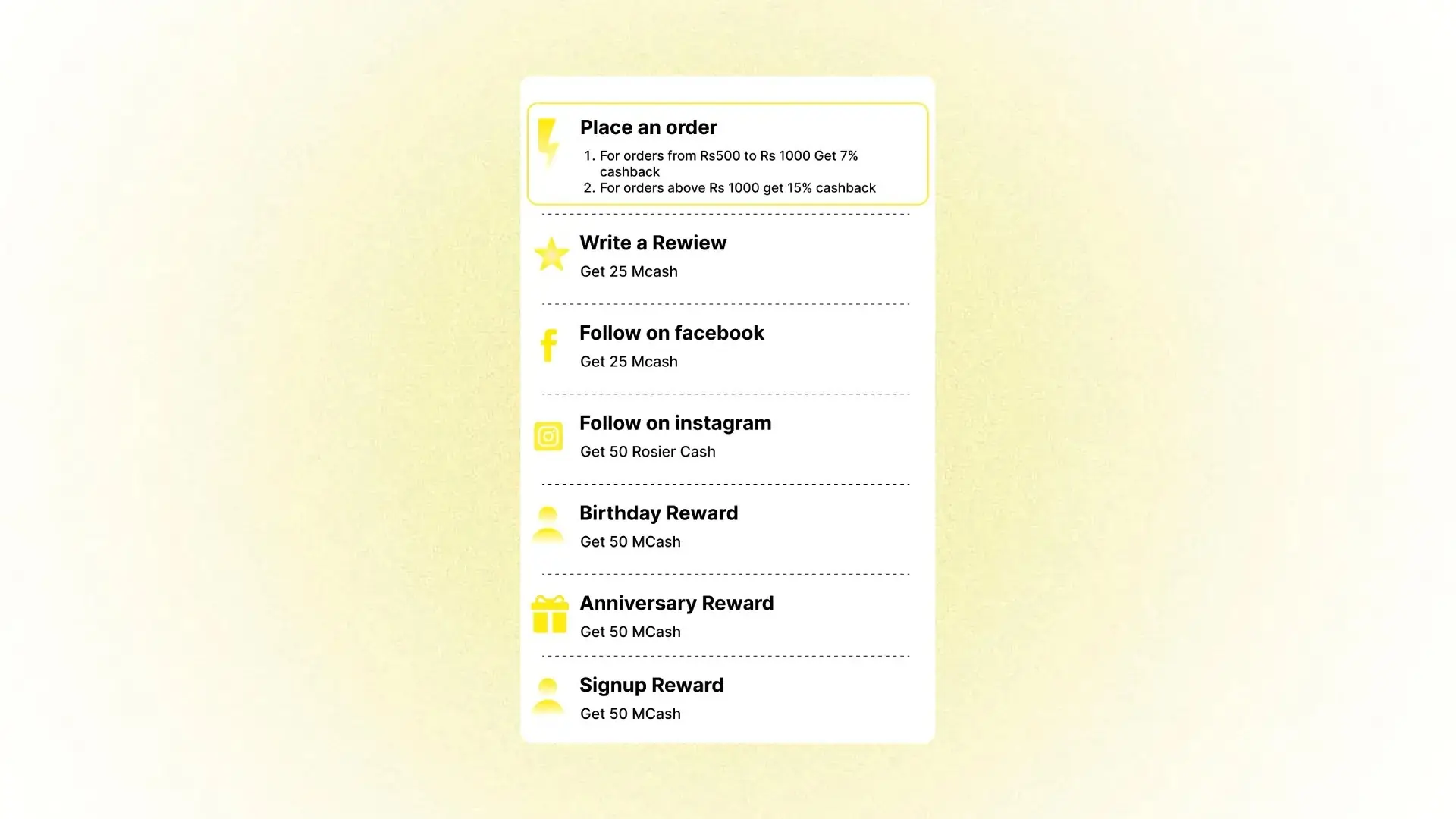
Encourage customers to spend more in a single transaction with Progressive Cashback Rewards. This smart incentive structure motivates higher purchase values by offering increasingly attractive cashback rates as customers reach different spending thresholds.
How It Works
The concept is simple but powerful: the more customers spend, the more they earn back.
The Business Impact
Progressive rewards create a win-win scenario:
- Increased Average Order Value (AOV) – Customers are motivated to add just a bit more to their cart to unlock the next cashback tier, naturally driving larger basket sizes.
- Enhanced Customer Satisfaction – Shoppers feel rewarded for their loyalty and appreciate the transparent value they receive.
- Improved Profit Margins – Higher order values often mean better economies of scale and increased revenue per transaction.
By implementing progressive cashback, you transform every purchase into an opportunity to deepen customer engagement while boosting your bottom line.
Flash Coins
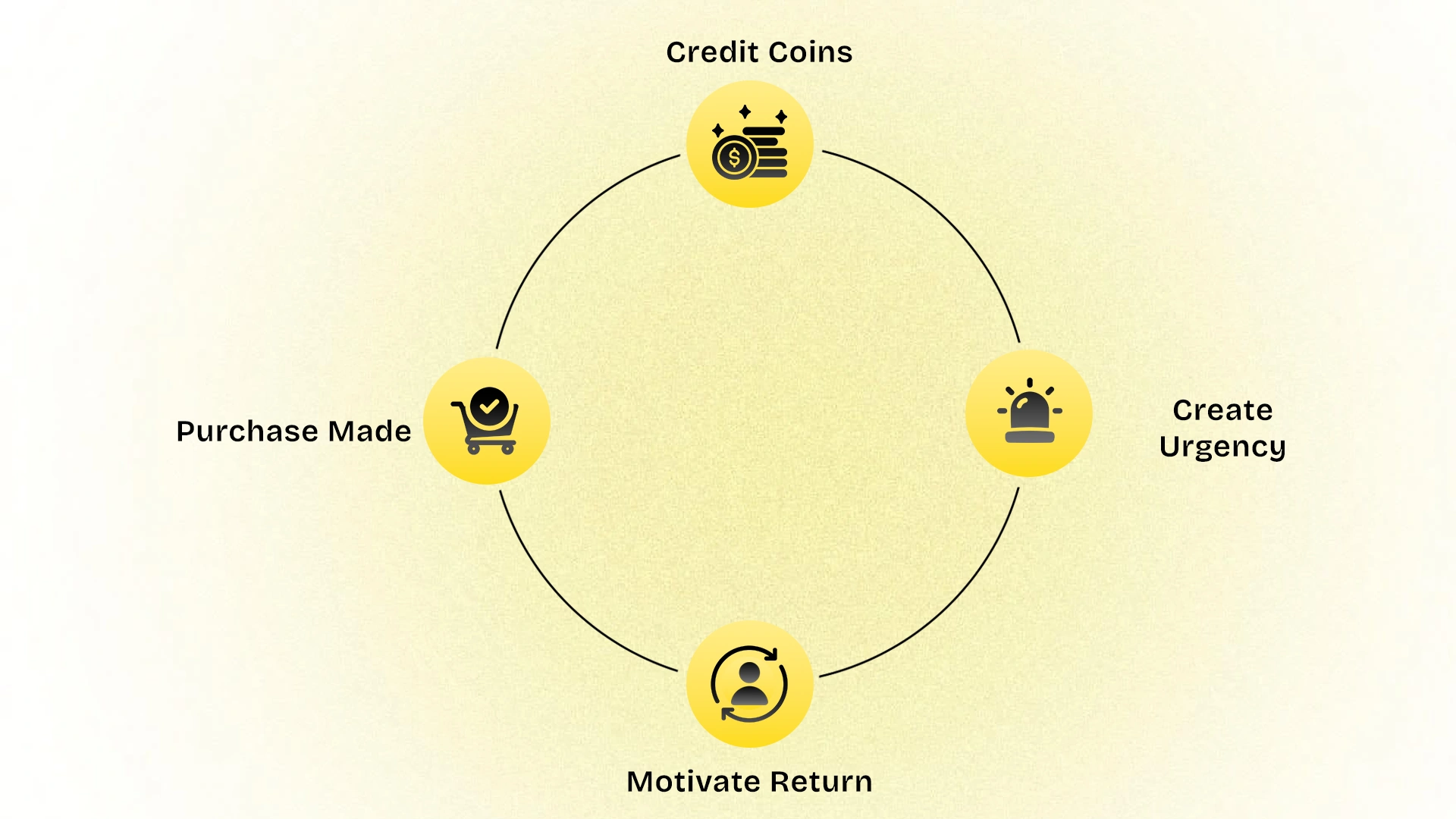
Bring inactive customers back with time-sensitive rewards. Flash Coins lets you credit temporary reward points to dormant customers with a built-in expiration date, creating powerful urgency that drives immediate purchases. This proven winback strategy reactivates customers who've gone quiet, boosts time-sensitive conversions, and turns "lost" customers into active buyers again—all with minimal risk and maximum impact.
Delayed Rewarding
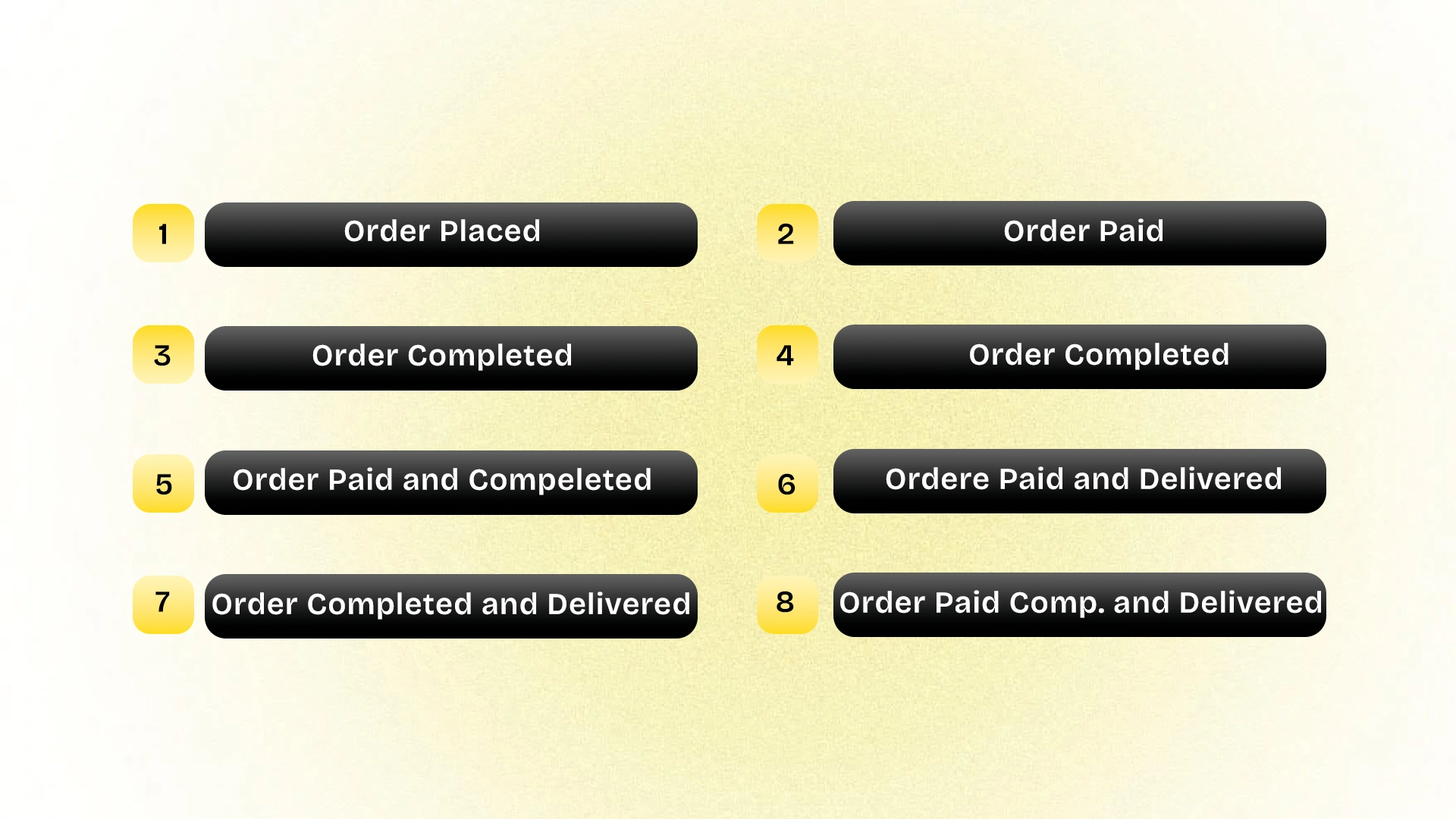
Protect your loyalty program from abuse and reduce administrative headaches with Delayed Rewarding. This smart feature prevents you from rewarding customers prematurely—only to have to reverse those points when orders are cancelled or products are returned.
The Problem It Solves
When you reward customers immediately upon order placement, cancellations and returns create unnecessary complications:
- Manual point reversals become time-consuming and error-prone
- Customers may feel penalized when points are clawed back
- Your program's integrity can be compromised by reward abuse
How Delayed Rewarding Works
Nector gives you complete control over when rewards are issued based on order status or custom Shopify tags. You can choose to release rewards only when orders reach specific milestones, such as:
- Order Fulfilled – Reward after the product has shipped
- Order Delivered – Wait until successful delivery confirmation
- Custom Tags – Create your own conditions based on your business logic (e.g., "payment verified" or "return window closed")
The Benefits
- Eliminates Reversal Hassles – No more manually tracking down and reversing points for cancelled or returned orders
- Protects Program Integrity – Ensures rewards are only given for completed, legitimate purchases
- Improves Customer Experience – Customers receive rewards at the right time without confusing deductions later
- Reduces Fraud Risk – Prevents exploitation by customers who might game the system
Set your reward timing to match your business workflow and maintain a clean, trustworthy loyalty program with minimal manual intervention.
Payment-Driven Variable Rewards
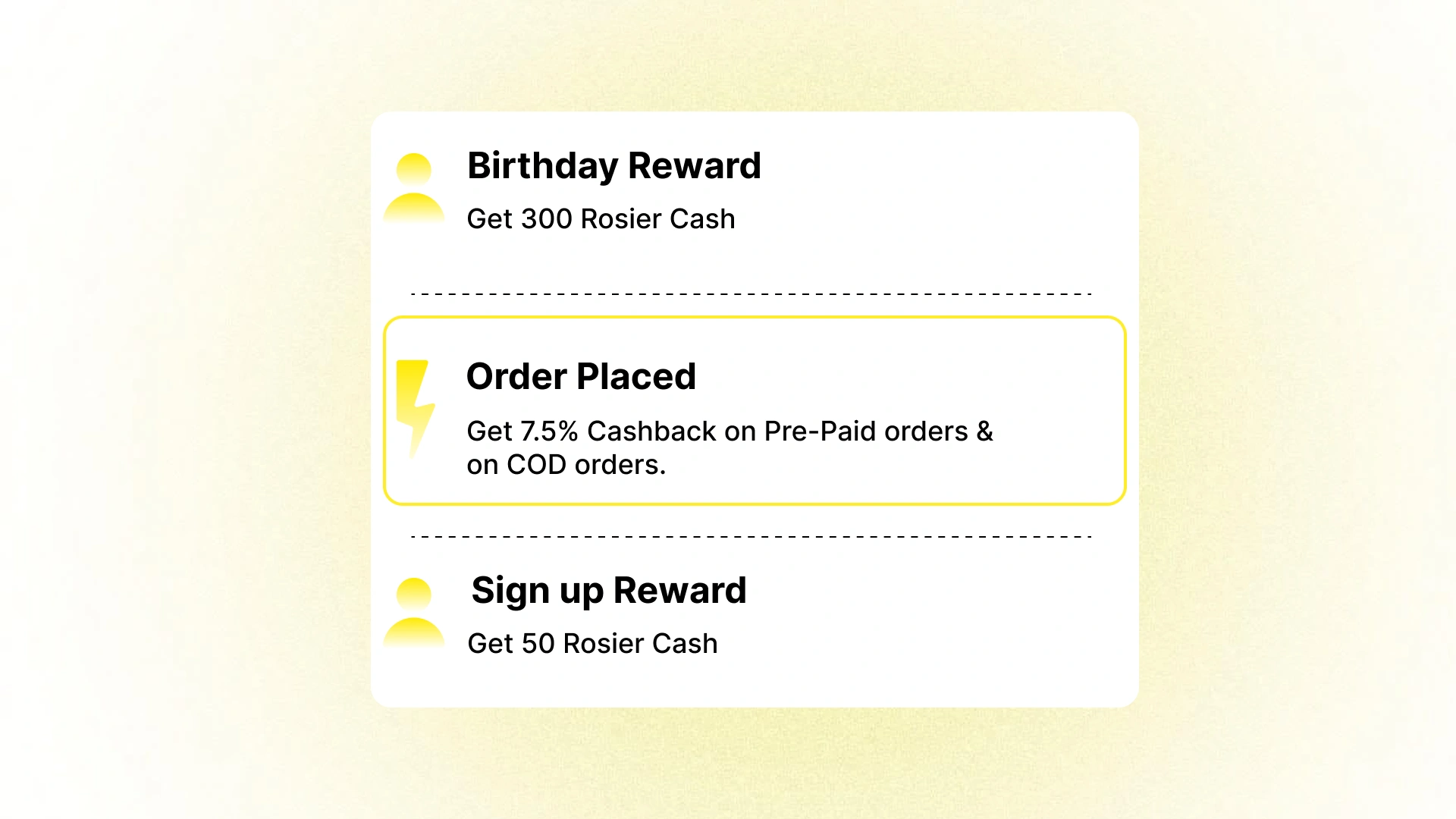
Reduce cash-on-delivery (COD) orders and improve cash flow by incentivizing prepaid payments. Nector's Payment-Driven Variable Rewards feature lets you offer enhanced rewards to customers who choose prepaid payment methods over COD, making upfront payment more attractive and beneficial.
Why This Matters
COD orders often come with higher operational costs, increased return rates, and delayed cash flow. By encouraging prepaid payments, you can:
- Improve Cash Flow – Receive payment immediately rather than waiting for delivery completion
- Reduce COD Risks – Lower the chances of order rejections, failed deliveries, and fraudulent transactions
- Decrease Operational Costs – Eliminate the expense and complexity of handling cash at delivery
- Increase Order Commitment – Prepaid customers are less likely to cancel or return orders
How It Works
With Nector, you can configure different reward rates based on payment method. For example:
- Prepaid Orders → Earn 10% cashback or 100 loyalty points
- Cash on Delivery → Earn 5% cashback or 50 loyalty points
The additional benefits make prepaid options significantly more appealing, naturally guiding customers toward the payment method that's best for your business while still rewarding them generously for their loyalty.
This win-win approach improves your operational efficiency while customers enjoy greater rewards for choosing prepaid payment.
Loyalty Program PDP Embeds
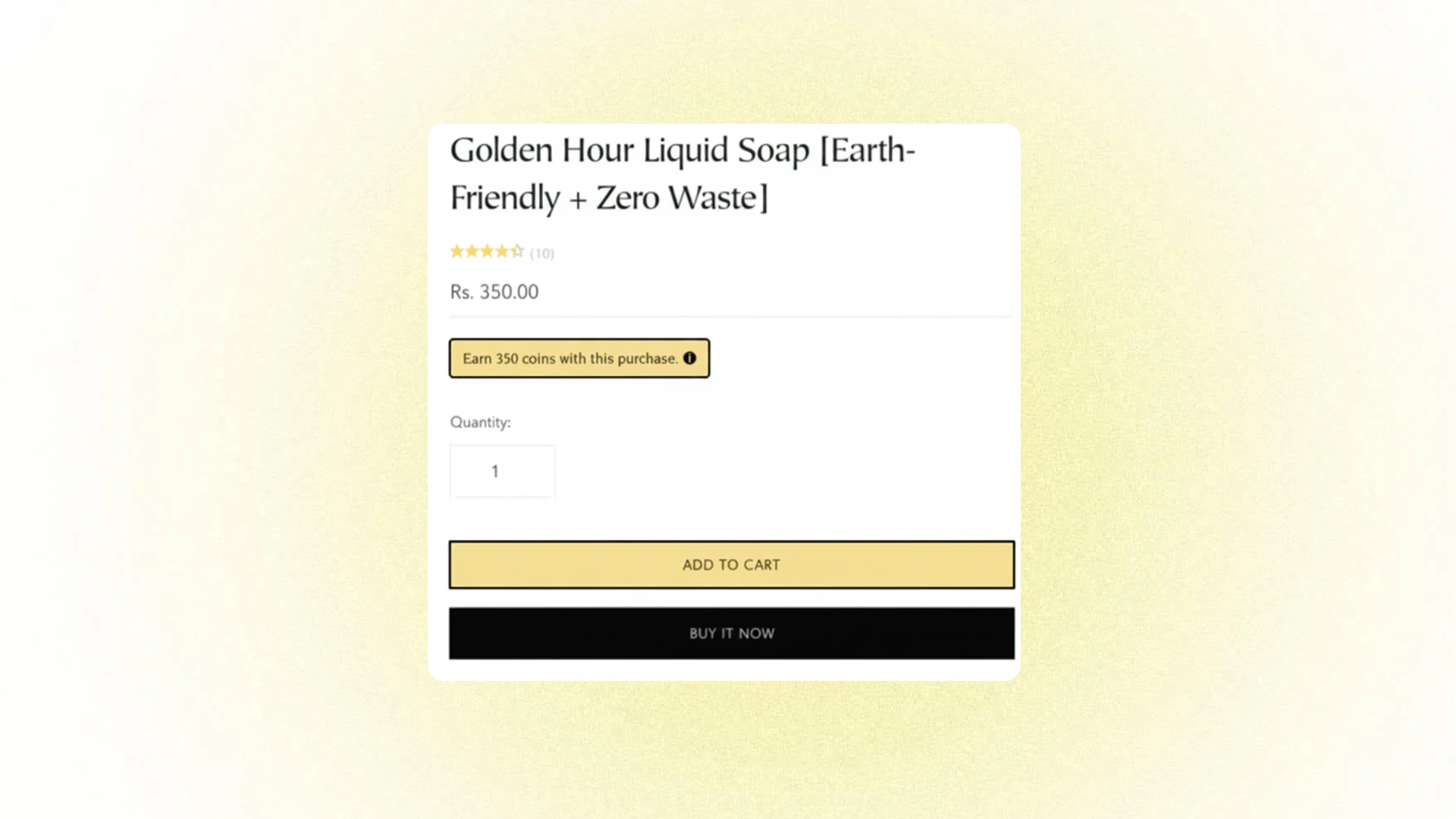
Make loyalty rewards visible at the moment of decision with Product Detail Page (PDP) embeds. This feature displays exactly how many points or cashback customers will earn when they purchase a specific product, helping them understand the value they'll receive with every transaction.
Why PDP Embeds Matter
When customers can see their potential earnings right on the product page, several powerful things happen:
- Increases Perceived Value – Customers immediately see the additional benefit beyond just the product itself, making the purchase more attractive.
- Drives Purchase Decisions – Knowing they'll earn rewards can be the final nudge needed to convert browsers into buyers.
- Builds Loyalty Awareness – Even customers who aren't yet enrolled in your program learn about the benefits they're missing, encouraging sign-ups.
- Enhances Transparency – Clear, upfront communication about rewards builds trust and sets accurate expectations.
How It Works
The embed automatically calculates and displays the reward amount based on the product price and your program's earning rules. Customers see messages like:
- "Earn 50 points with this purchase."
- "Get 5% cashback when you buy."
- "Purchase this item and earn $5 in rewards."
By integrating loyalty information directly into the shopping experience, you transform every product page into an opportunity to reinforce the value of your rewards program and motivate purchases.
Customer Accessibility
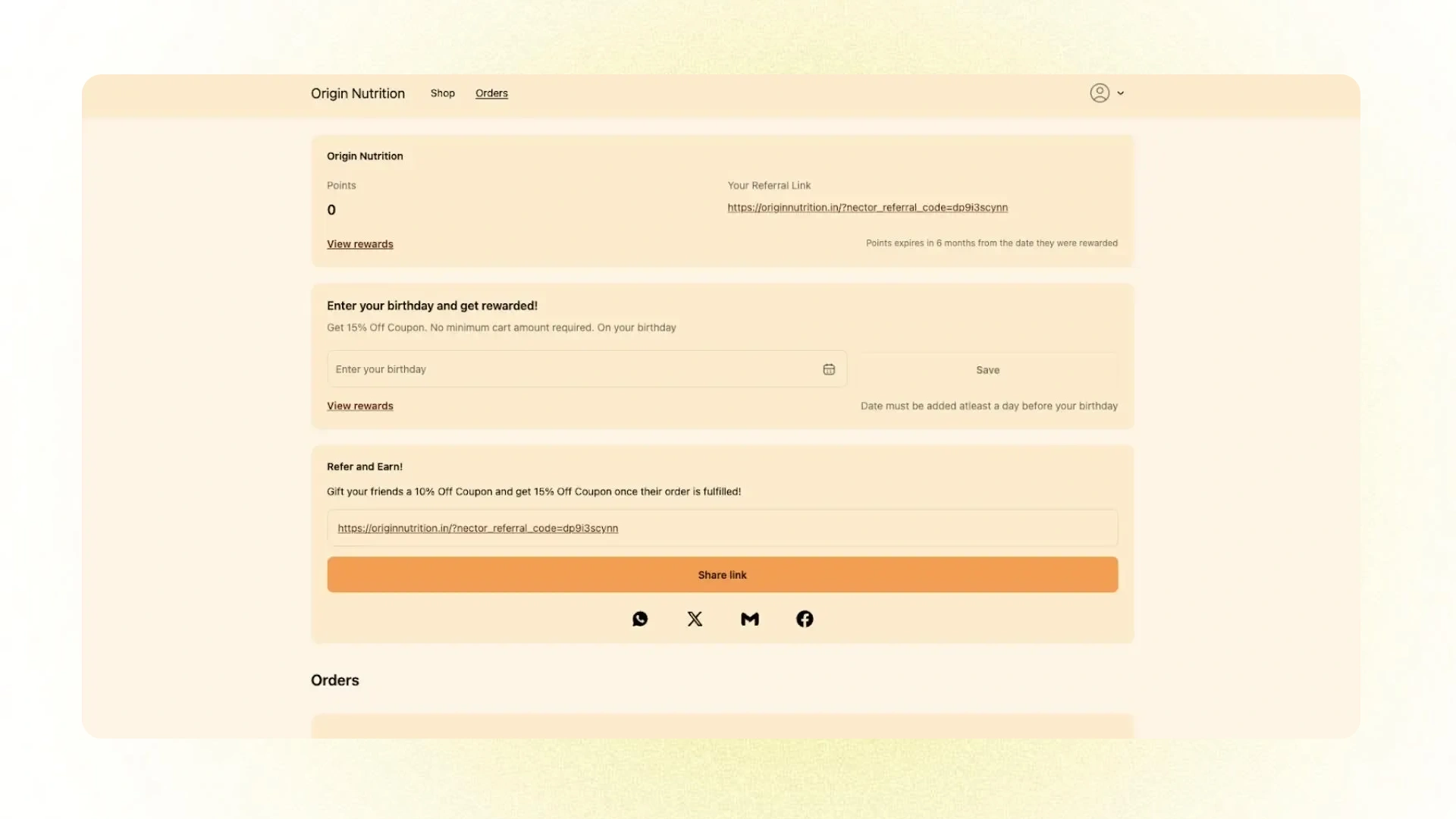
Make your loyalty and referral programs effortlessly accessible with seamless integration into your customers' account experience. Nector's Customer Accessibility features ensure that engaging with your rewards program is intuitive, convenient, and fully embedded within the natural customer journey.
Expanded Customer Account Widgets (Shopify)
Nector now integrates loyalty, referral, and birthday widgets directly into Shopify's native Customer Account profile page, creating a unified self-service hub for all program interactions.
What's Included:
- Loyalty Points Dashboard – Customers can view their current point balance, earning history, and available rewards
- Referral Links & Tracking – Easy access to personal referral links and real-time tracking of referral rewards
- Birthday & Anniversary Benefits – Clear visibility into special occasion rewards and redemption options
The Benefits
- Enhanced Self-Service – Customers can manage their entire loyalty experience without leaving their account page, reducing support inquiries and improving satisfaction.
- Seamless Integration – The widgets blend naturally with Shopify's native account interface, creating a cohesive brand experience rather than feeling like a third-party add-on.
- Improved Engagement – When loyalty features are easily accessible, customers are more likely to check their status, redeem rewards, and share referral links regularly.
- Reduced Friction – No need for separate logins, pop-ups, or confusing navigation—everything customers need is right where they expect it.
By embedding loyalty program access directly into the customer account experience, you create a frictionless path to engagement that keeps customers connected to your rewards ecosystem.
Earning Coins Display on PDP and Checkbox on PDP

Drive conversions and reward redemption by making loyalty benefits visible and actionable right on the product detail page. This dual-feature approach shows customers exactly what they'll earn while giving them the power to instantly apply saved coins, all without leaving the product page.
How It Works
Earning Coins Display: When customers view a product, they immediately see how many loyalty points or coins they'll earn with their purchase. This transparency adds perceived value to every item and reinforces the benefits of being a loyalty member.
Redemption Checkbox: For customers who have already accumulated coins, a convenient checkbox appears, allowing them to apply their saved rewards directly to the current purchase. This frictionless redemption process encourages customers to use their points and experience the tangible value of your loyalty program.
Earning Message: "Earn 100 points on this purchase. Use them for discounts on your next order!"
Redemption Message: "Apply 500 points to save ₹50 on this order."
The Benefits
- Motivates Purchase Decisions – Seeing potential earnings can be the final nudge customers need to complete their purchase.
- Encourages Point Redemption – The easy-to-use checkbox removes friction, making customers more likely to experience the joy of "free" discounts.
- Increases Engagement – Customers interact with your loyalty program at the most critical moment when they're ready to buy.
- Builds Program Value – By showing both earning and redemption opportunities, you demonstrate the ongoing cycle of value your loyalty program provides.
This feature creates a powerful moment of clarity where customers see both what they'll gain and what they can save, making every product page a loyalty touchpoint that drives action.
Lead Magnet Popup
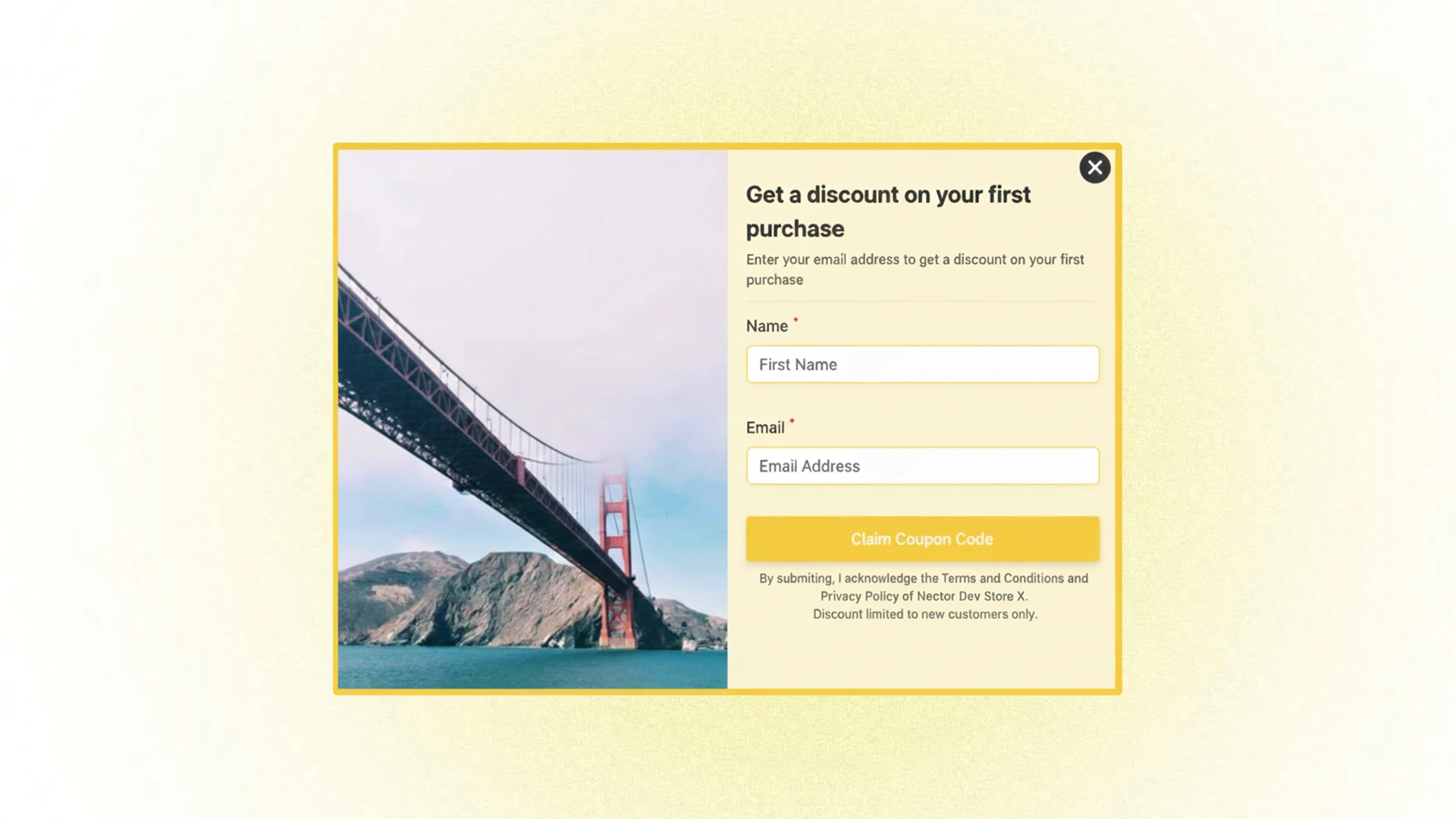
Turn first-time visitors into engaged customers and valuable contacts with Nector's Lead Magnet Popup. This strategic tool captures visitor information by offering an irresistible incentive, helping you build your customer database while driving initial conversions.
How It Works
When new visitors land on your website, they're greeted with an attractive pop-up offering an exclusive first-time discount, bonus loyalty points, or special welcome reward in exchange for their email address or contact information.
Example Offers:
- "Get 10% off your first order + 100 bonus points!"
- "Join now and receive ₹500 in welcome rewards."
- "Subscribe and earn 200 points instantly."
The Benefits
- Grows Your Email List – Capture contact information from interested visitors before they leave your site, building a valuable marketing asset.
- Drives First Purchase – An enticing offer reduces the barrier to that crucial first transaction, converting browsers into buyers.
- Enrolls Loyalty Members – Automatically onboard new customers into your loyalty program from their very first interaction.
- Maximizes Visitor Value – Even if visitors don't purchase immediately, you've captured their information for future remarketing campaigns.
- Creates Positive First Impression – Welcoming new visitors with a gift establishes goodwill and positions your brand as generous and customer-focused.
Strategic Data Collection
The information you collect through lead magnet popups becomes a powerful business asset. Use it to:
- Send targeted email campaigns
- Personalize future shopping experiences
- Segment audiences for tailored promotions
- Track customer journey from first visit to loyal advocate
By combining an attractive offer with smart data collection, the Lead Magnet Popup transforms anonymous traffic into identifiable prospects ready to engage with your brand.
Point Redemption at Checkout
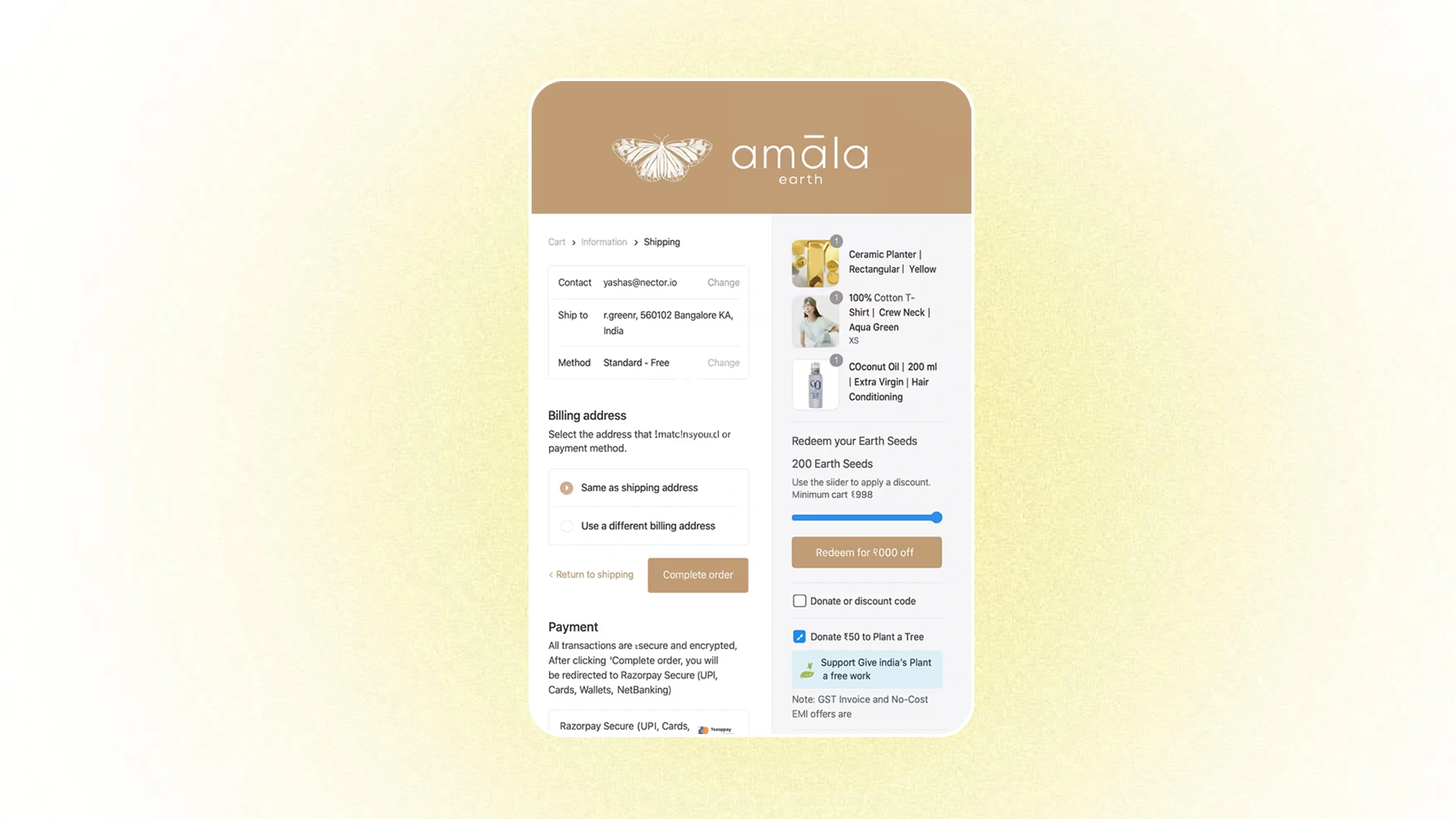
Make reward redemption effortless and visually engaging with an interactive slider at checkout. This intuitive feature gives customers complete control over how many loyalty coins they want to apply to their purchase, removing friction and maximizing redemption rates.
How It Works
A sleek, user-friendly slider appears on the checkout page, allowing customers to visually adjust how many coins they want to redeem in real-time. As they move the slider, they instantly see:
- The number of coins being applied
- The discount amount they're receiving
- Their updated order total
This interactive experience makes redemption feel tangible and rewarding, encouraging customers to use their hard-earned points rather than letting them accumulate unused.
The Benefits
- Removes Redemption Friction – No more guessing how many points to use or complicated redemption codes—customers simply slide to their desired discount.
- Increases Redemption Rates – The visual, interactive nature makes using points feel easy and satisfying, encouraging more frequent redemption.
- Enhances Customer Experience – Customers feel in control of their savings and can optimize their point usage based on their current purchase.
- Drives Repeat Purchases – When customers experience the joy of "free" discounts through point redemption, they're motivated to earn and redeem again.
- Clear Value Visualization – The real-time calculation shows customers exactly what their loyalty is worth, reinforcing the value of your program.
Note: This feature is available exclusively for Shopify Plus websites.
Coin Expiry
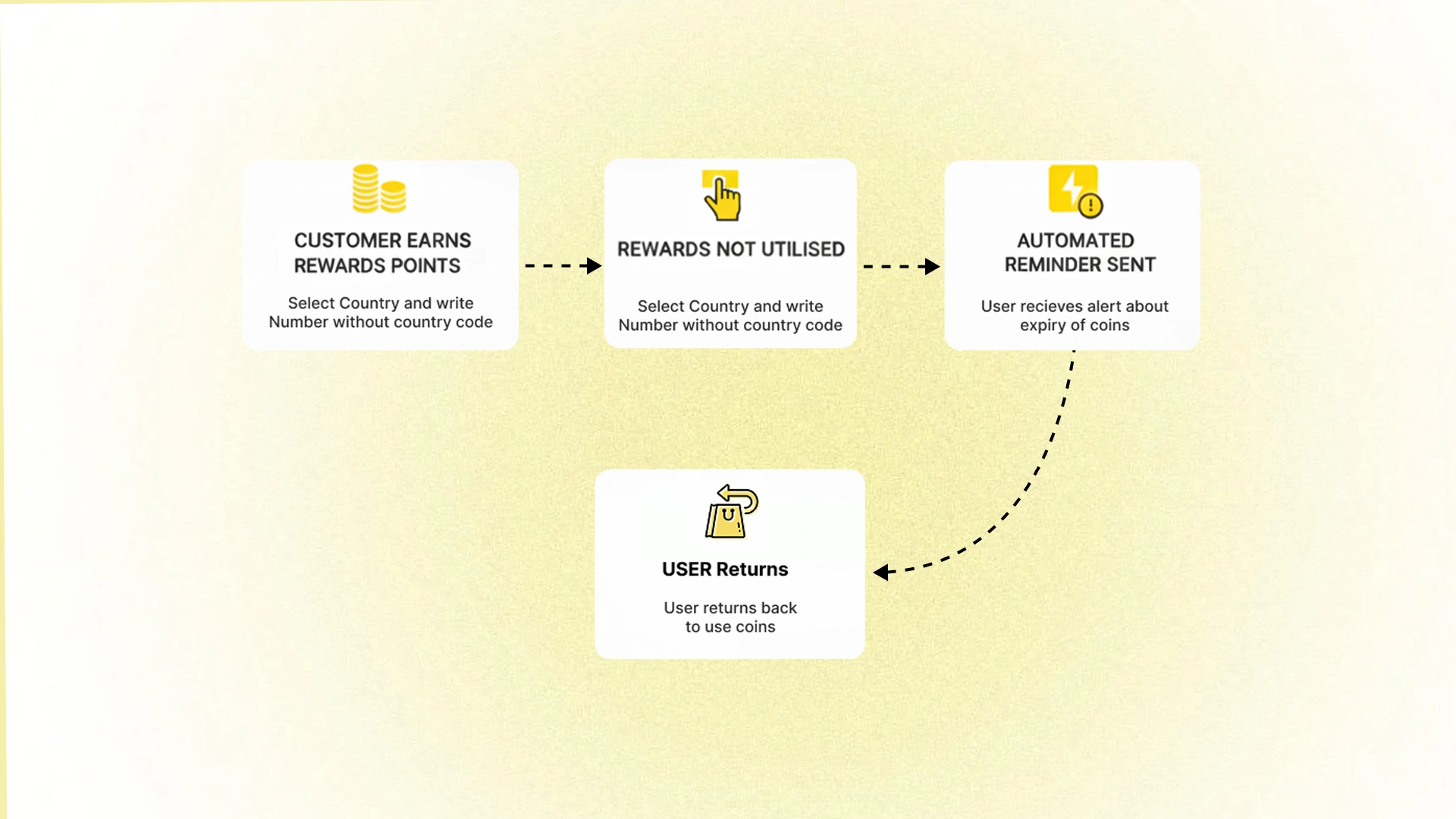
Create urgency and drive action with strategic coin expiration dates. This powerful feature motivates customers to return to your store and redeem their earned rewards before they expire, transforming accumulated points into actual purchases and re-engaging dormant customers.
The Challenge It Solves
When customers earn coins but never redeem them, several problems arise:
- Customers miss out on the full value and satisfaction of your loyalty program
- Your business carries unredeemed points as a growing liability
- Inactive customers drift away without experiencing the joy of reward redemption
- The program fails to drive the repeat purchases it's designed to generate
How Coin Expiry Works
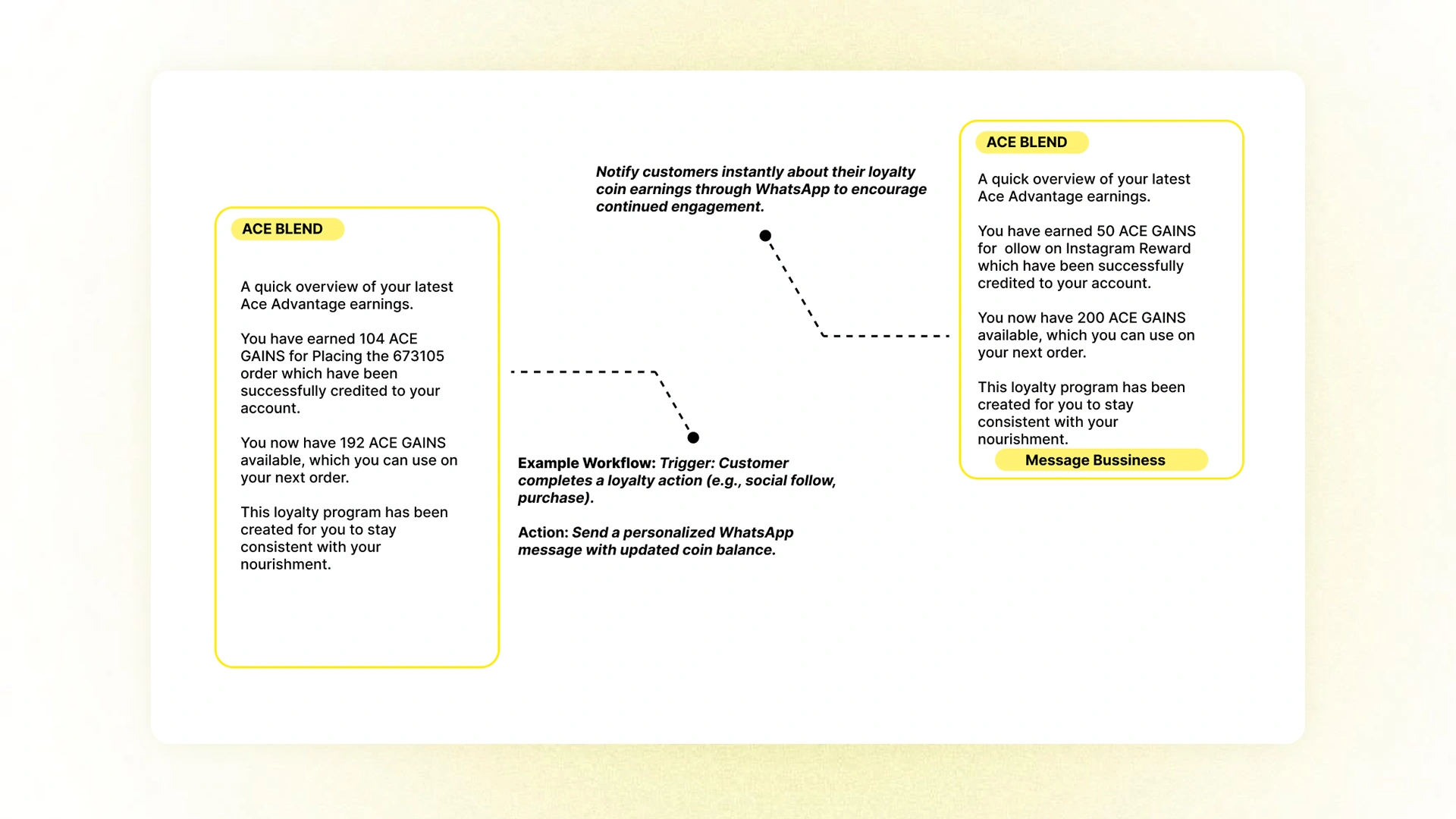
You set a defined expiration timeframe for loyalty coins—whether it's 6 months, 1 year, or a custom period that fits your business model. As coins approach their expiration date, customers receive notifications reminding them to use their rewards before it's too late.
The Benefits
- Creates Urgency – The "use it or lose it" deadline motivates customers to take action rather than indefinitely postponing redemption.
- Re-Engages Dormant Customers – Expiration reminders bring inactive customers back to your website, giving you another chance to win their business.
- Drives Time-Sensitive Conversions – Customers are more likely to make purchases when they have a compelling reason to act now.
- Reduces Liability – Expired points help manage your program's financial obligations while maintaining fairness.
- Encourages Active Participation – Regular expiration cycles train customers to engage with your program consistently rather than treating it passively.
Best Practices
- Send reminder notifications 30, 14, and 7 days before expiration
- Clearly communicate expiration policies upfront when customers join
- Consider offering a grace period or extension for highly engaged customers
- Use expiration emails as an opportunity to showcase new products or special offers
Coin expiry transforms your loyalty program from a passive benefit into an active driver of customer behavior, ensuring that earned rewards translate into meaningful engagement and revenue.
Control & Customization Features
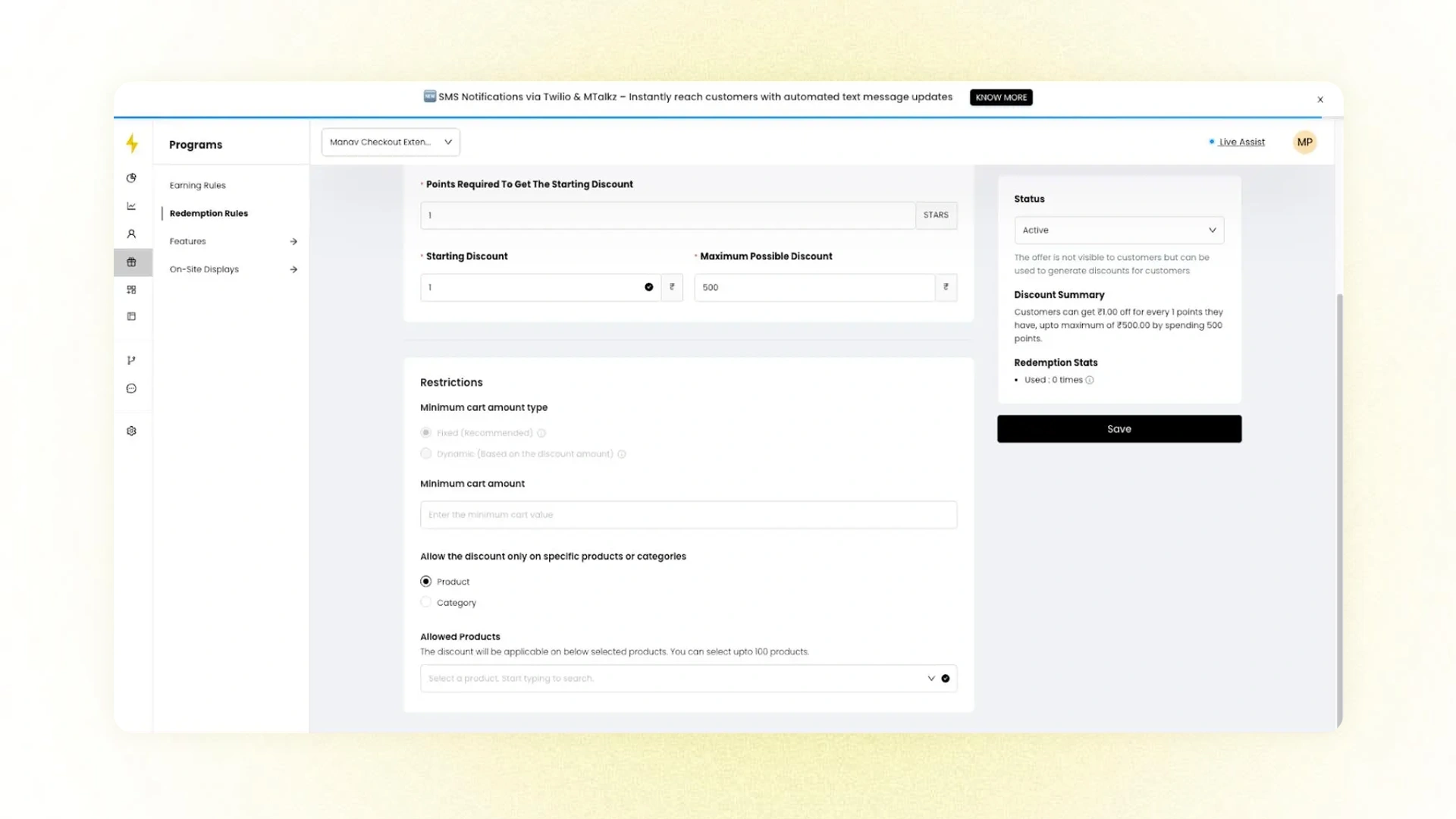
Take complete command of your loyalty program economics with advanced control and customization options. These powerful features give you granular control over how and when loyalty points can be earned, redeemed, and expired—ensuring your program drives engagement while protecting your profitability.
Product-Specific Redemption Control
Protect your margins and maintain strategic pricing by controlling exactly which products are eligible for point redemption. This feature allows you to restrict or enable redemption at the product or collection level, giving you precise control over your loyalty program economics.
How It Works
Using Shopify collections, you can define redemption rules that either:
- Exclude specific products or collections from point redemption (e.g., gift cards, sale items, or high-margin exclusives)
- Limit redemption to specific products or collections (e.g., allow points only on select promotional items)
Primary Use Cases
- Protect High-Margin Items – Prevent additional discounts on products where margins are already optimized or thin.
- Exclude Gift Cards – Maintain the full value of gift card purchases without point-based discounts that could create arbitrage opportunities.
- Control Promotional Strategy – Keep sale items, new releases, or limited editions at their intended price points.
- Preserve Brand Positioning – Protect premium products from excessive discounting that could devalue the brand.
- Optimize Profitability – Ensure loyalty rewards drive purchases on the right products—ones where discounts still maintain healthy margins.
Strategic Benefits
This level of control ensures your loyalty program works for your business, not against it. You can be generous with rewards while strategically protecting products where additional discounts would hurt profitability or brand positioning.
Implementation Note: This feature currently requires GoKwik checkout integration to function.
Custom Point Expiry
Create campaign-specific expiration rules that override your standard settings. Using Shopify order tags, you can set unique, temporary expiry dates for points earned through special promotions—like "Holiday bonus points expire in 30 days." This flexibility lets you run targeted campaigns with tailored urgency, driving faster redemption and repeat purchases without disrupting your core program structure.
Note: Currently only applicable to Order Rewards.
New Reward Distribution & Types
Celebrate customer milestones and deepen emotional connections with expanded reward types and flexible distribution options. These enhancements give you more opportunities to surprise and delight customers at meaningful moments in their journey with your brand.
New Anniversary / Birthday Rewards with "Instant" Distribution

Expanded Reward Types:
Beyond traditional birthday rewards, Nector now supports Anniversary Rewards—allowing you to celebrate significant customer milestones such as:
- The anniversary of their account signup
- The anniversary of their first purchase
- Membership tier anniversaries
- Any custom milestone that matters to your brand relationship
These anniversary rewards run parallel to birthday rewards, giving you multiple touchpoints throughout the year to recognize and reward customer loyalty.
"Instant" Distribution Logic:
The new "Instant" distribution option creates an immediate moment of delight by providing the reward the very first time a customer enters their relevant date (birthday or anniversary). This immediate gratification:
- Creates Positive First Impressions – Customers instantly experience the value of sharing their information with you.
- Boosts Initial Engagement – The immediate reward encourages customers to explore and interact with your loyalty program right away.
- Builds Emotional Connection – Instant recognition makes customers feel valued and appreciated from the start.
- Increases Data Collection – When customers see they'll receive something immediately, they're more motivated to complete their profile information.
Strategic Benefits
- Year-Round Engagement – Multiple milestone rewards mean more opportunities to re-engage customers throughout the year, not just on their birthday.
- Personalized Recognition – Celebrating individual customer anniversaries makes your relationship feel personal and valued.
- Flexible Timing – Choose between instant rewards for immediate impact or scheduled delivery on the actual anniversary date for anticipated excitement.
- Strengthened Loyalty – Recognizing milestones beyond transactions shows you value the relationship, not just the sales.
Example Use Cases
- "Happy 1st Anniversary! Here's 500 bonus points to celebrate your first year with us."
- "It's been 2 years since your first order—enjoy 20% off as our thank you!"
- "Welcome to our VIP tier! Here are 1000 anniversary points, instantly added to your account."
By expanding both the types of celebrations and the timing of rewards, you create a loyalty program that feels thoughtful, generous, and genuinely invested in the customer relationship.
Referral Embed at Checkout
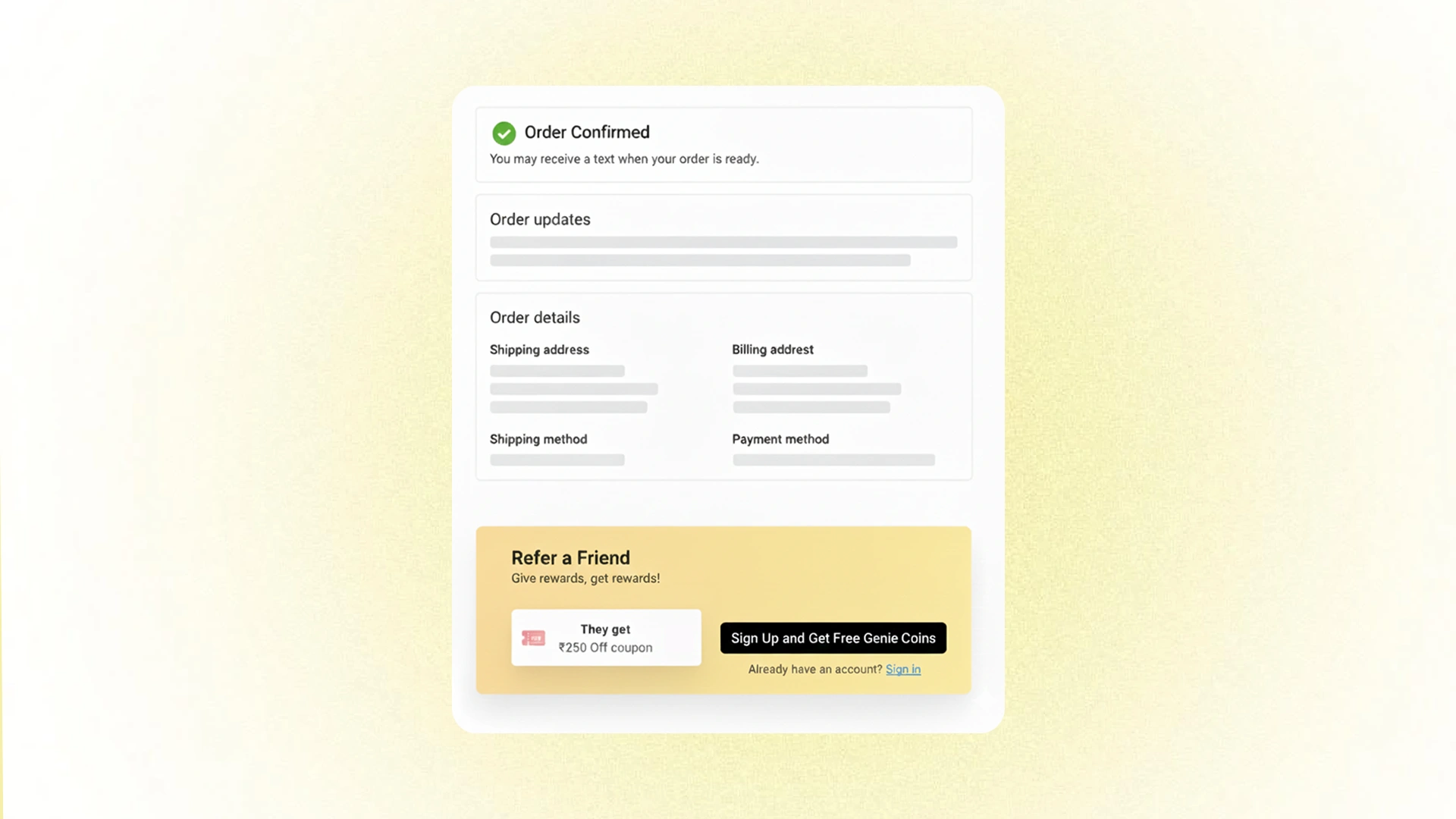
Referral is strategically placed on your checkout page
Capture customer enthusiasm at the perfect moment with a referral embed strategically placed on your checkout page. This feature leverages the post-purchase high, when customers are most satisfied and motivated, to turn happy buyers into active brand advocates.
The Psychology Behind It
Customers are most likely to refer others when they're in an action-taking mindset and feeling positive about their purchase. The checkout page represents this ideal moment:
- They've just committed to buying from you
- They're experiencing purchase satisfaction and anticipation
- They're already in "completion mode," making it natural to take one more quick action
- Their positive emotions about your brand are at their peak
How It Works
A simple, non-intrusive referral widget appears on the checkout or thank-you page, allowing customers to easily enter the email addresses of friends and family they'd like to refer. The process is quick, seamless, and capitalizes on their current momentum.
Example messaging:
- "Love what you bought? Share it with friends, and you'll both get 10% off!"
- "Know someone who'd love this? Refer them now and earn 500 bonus points!"
- "Share the joy, invite a friend, and you both get rewarded!"
The Benefits
- Higher Conversion Rates – Customers are more willing to refer when they're already engaged and taking action on your site.
- Immediate Action – Capturing referrals in the moment prevents "I'll do it later" procrastination that often means it never happens.
- Quality Referrals – Post-purchase enthusiasm leads to more genuine, enthusiastic recommendations to friends who are truly likely to be interested.
- Increased Participation – Making referrals this easy removes friction and dramatically increases program participation rates.
- Amplified Satisfaction – Sharing their purchase extends the customer's positive feelings and reinforces their buying decision.
Strategic Placement
The checkout page is a conversion goldmine because customers are:
- Already satisfied with their experience
- In the mindset of completing tasks
- More receptive to quick, easy actions
- Less likely to abandon the process
By embedding referrals at this critical touchpoint, you transform every successful purchase into a potential acquisition channel.
Thank You Page (Referral & Earn Coins Section)
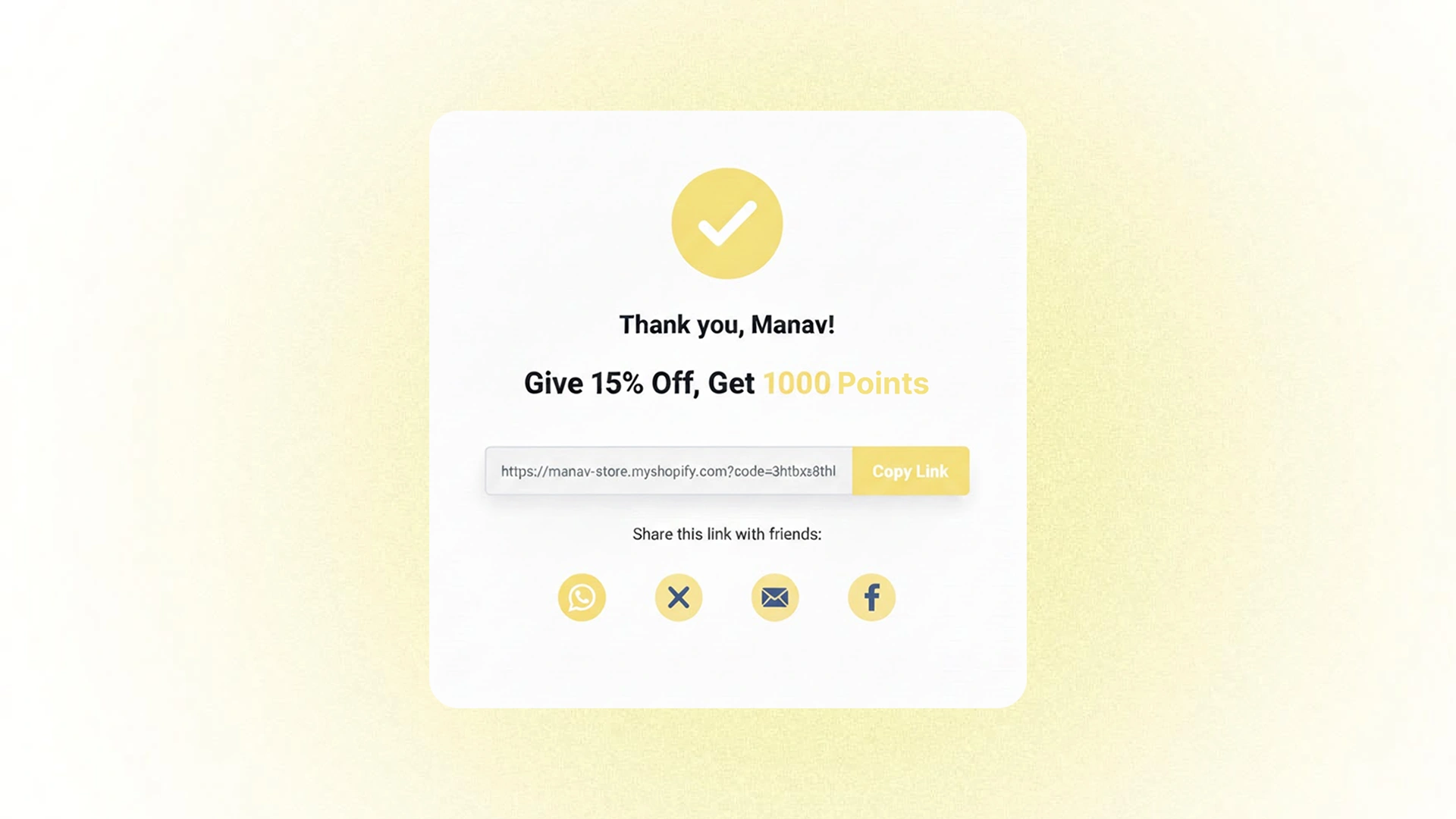
Transform post-purchase satisfaction into powerful word-of-mouth marketing with strategic messaging on your Thank You page. This feature capitalizes on the customer's peak enthusiasm by encouraging referrals and highlighting loyalty earnings right after they complete their order.
How It Works
When customers land on the Thank You page after completing their purchase, they're greeted with two key elements:
1. Referral Invitation A clear, compelling call-to-action encouraging them to share their positive experience with friends, complete with their unique referral link and the benefits both parties will receive.
2. Loyalty Earnings Confirmation: A summary of the loyalty points or coins they've just earned from their purchase, reinforcing the ongoing value of being a member of your program.
Example Workflow
Trigger: Customer completes checkout and lands on the Thank You page
Display Elements:
- Personalized referral link ready to share
- Clear explanation of referral incentives for both parties
- Confirmation of points earned fromthe current purchase
- Simple sharing options (copy link, email, social media)
The Benefits
- Maximizes Referral Participation – Catching customers at their most enthusiastic dramatically increases sharing rates
- Reinforces Loyalty Value – Seeing their earned points immediately after purchase strengthens their connection to your program
- Reduces Friction – Everything needed to refer is right there—no hunting for links or wondering how the program works
- Creates Positive Closure – The Thank You page becomes more than just confirmation; it's an opportunity to deepen engagement
- Amplifies Purchase Satisfaction – Customers feel rewarded twice: for their purchase and for the opportunity to help friends save
By strategically utilizing the Thank You page, you turn the end of one customer journey into the beginning of many more.
Offer a Free Product as a Reward

Create memorable, tangible reward experiences by offering free products instead of traditional discounts. While monetary savings are valuable, receiving an actual physical product as a gift often feels more exciting, personal, and rewarding to customers—transforming your loyalty program from transactional to experiential.
Why Free Products Work
Physical products as rewards create a different psychological impact than discounts:
- Tangible Excitement – Receiving a "gift" feels like winning something special, not just saving money
- Discovery Opportunity – Customers get to try products they might not have purchased otherwise
- Complementary Value – Strategic product rewards introduce customers to items that pair well with their purchases
- Emotional Connection – Gifts create stronger positive associations with your brand than discounts alone
- Perceived Higher Value – A $20 product often feels more valuable than a $20 discount
How It Works with Nector
You can configure specific products as redeemable rewards that customers can claim by redeeming a designated number of loyalty coins. The process is seamless:
- Customer browses available product rewards in their loyalty account
- They select the free product they want to claim
- They redeem the required coins
- The product is automatically added to their cart at checkout
- They complete their order and receive their reward with their purchase
Strategic Use Cases
Sample Products:
- Deluxe samples or travel-size versions of premium items
- Complementary accessories that enhance the main products
- New product launches you want customers to try
- Seasonal or limited-edition items that create urgency
- Brand merchandise that builds community and advocacy
Example Scenarios:
- Skincare brand: "Redeem 500 coins for a free luxury face mask."
- Coffee company: "Get a free reusable tumbler for 1,000 points."
- Fashion retailer: "Claim complimentary earrings with 750 points."
- Food brand: "Free signature sauce with your next order—just 300 points."
The Benefits
- Increased Perceived Value – Products feel more generous and exciting than percentage discounts
- Cross-Selling Opportunity – Introduce customers to complementary products they'll love and want to buy again
- Higher Redemption Rates – The novelty and tangibility of product rewards motivate more frequent redemption
- Brand Experience Enhancement – Thoughtful product gifts strengthen emotional connection to your brand
- Inventory Management – Move slower inventory or promote new launches strategically
- Social Sharing – Customers are more likely to share photos of free products than screenshots of discounts
By offering free products as rewards, you transform your loyalty program from a discount mechanism into a gift-giving experience that customers genuinely look forward to engaging with.
Membership
With a Paid Membership, customers subscribe for a fixed duration (e.g., ₹299 for 6 months) to unlock exclusive perks. Unlike regular shoppers, members enjoy consistent benefits and earn more through loyalty rewards.
How it Works
- Customers purchase a membership plan for a set time period.
- Membership perks apply automatically to all their orders.
- Can be combined with loyalty rewards for greater value.
Benefits
- Fixed discount on every order (e.g., 10% off)
- Free shipping on all orders
- 1.5x loyalty coins on every purchase
Unlock Member-Only Pricing with the Custom Price Widget
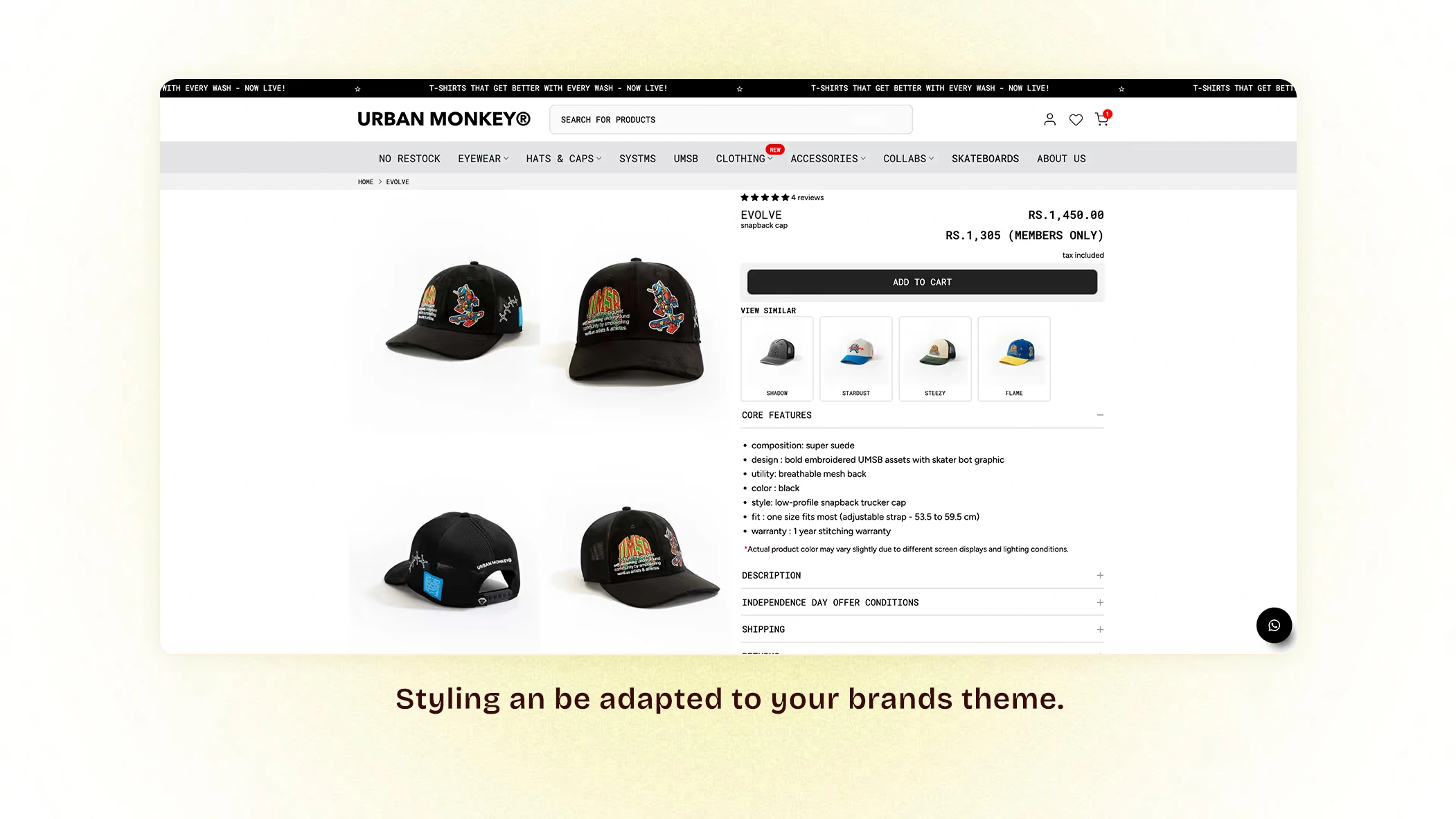
Create powerful exclusivity and drive membership conversions with transparent member pricing displayed right where it matters most.
What It Does:
The Custom Price Widget appears on both Product Display Pages (PDP) and Product Listing Pages (PLP), automatically showing different prices based on membership status:
- For Members: Discounted member price is prominently displayed
- For Non-Members: Regular price is shown with a hint of the savings they're missing
Example Display:
Non-member sees: ₹1,299
Member sees: ₹1,169 (Member Price - Save 10%)
Why This Widget Is Powerful
1. Incentivizes Sign-Ups: Non-members browsing your site constantly see the savings they could unlock, creating FOMO (fear of missing out) and motivating membership purchases. Every product page becomes a subtle membership sales pitch.
2. Strengthens Member Retention: Current members receive constant validation of their smart decision. Seeing their exclusive price on every product reinforces the value they're receiving and reduces churn.
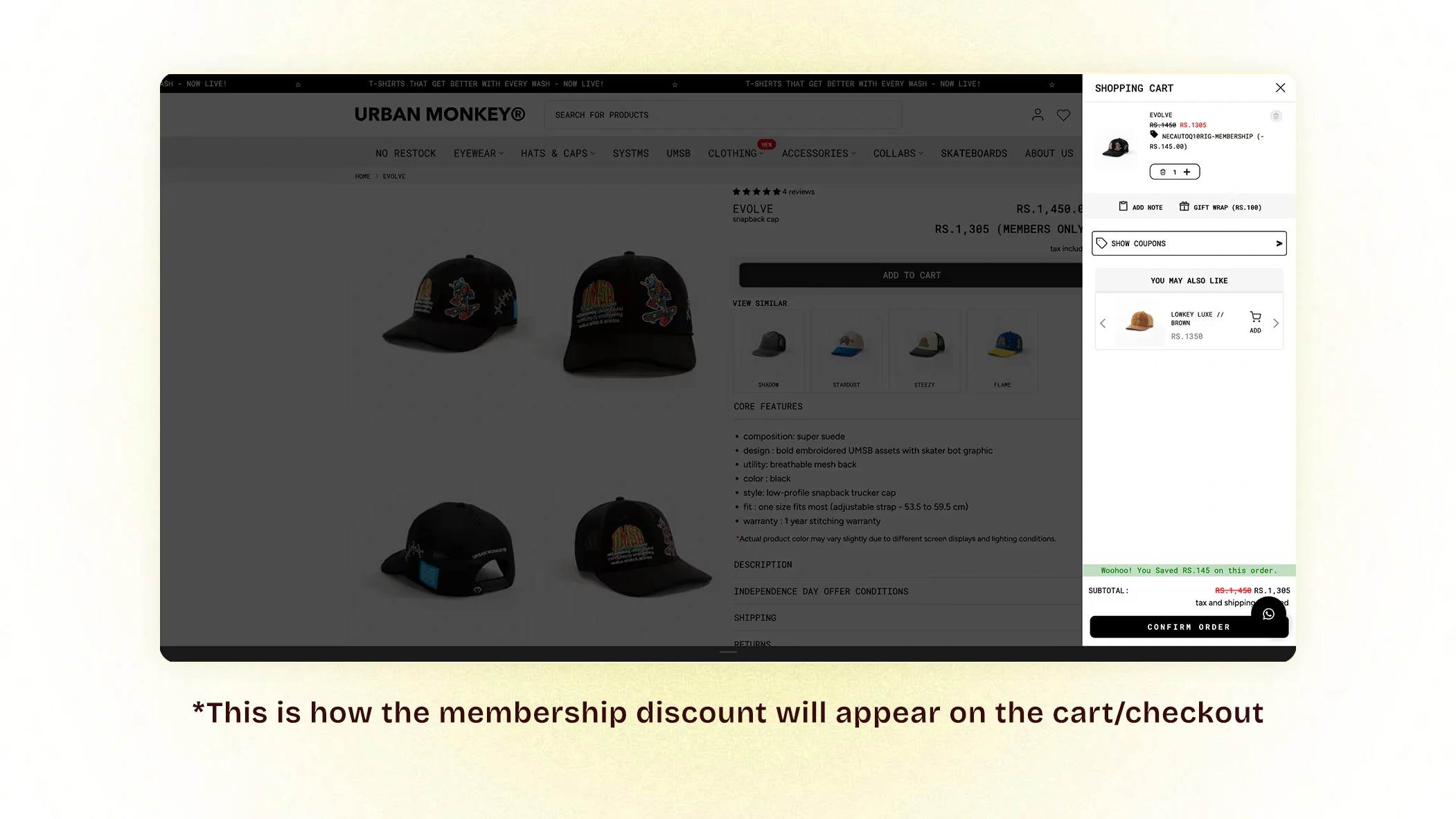
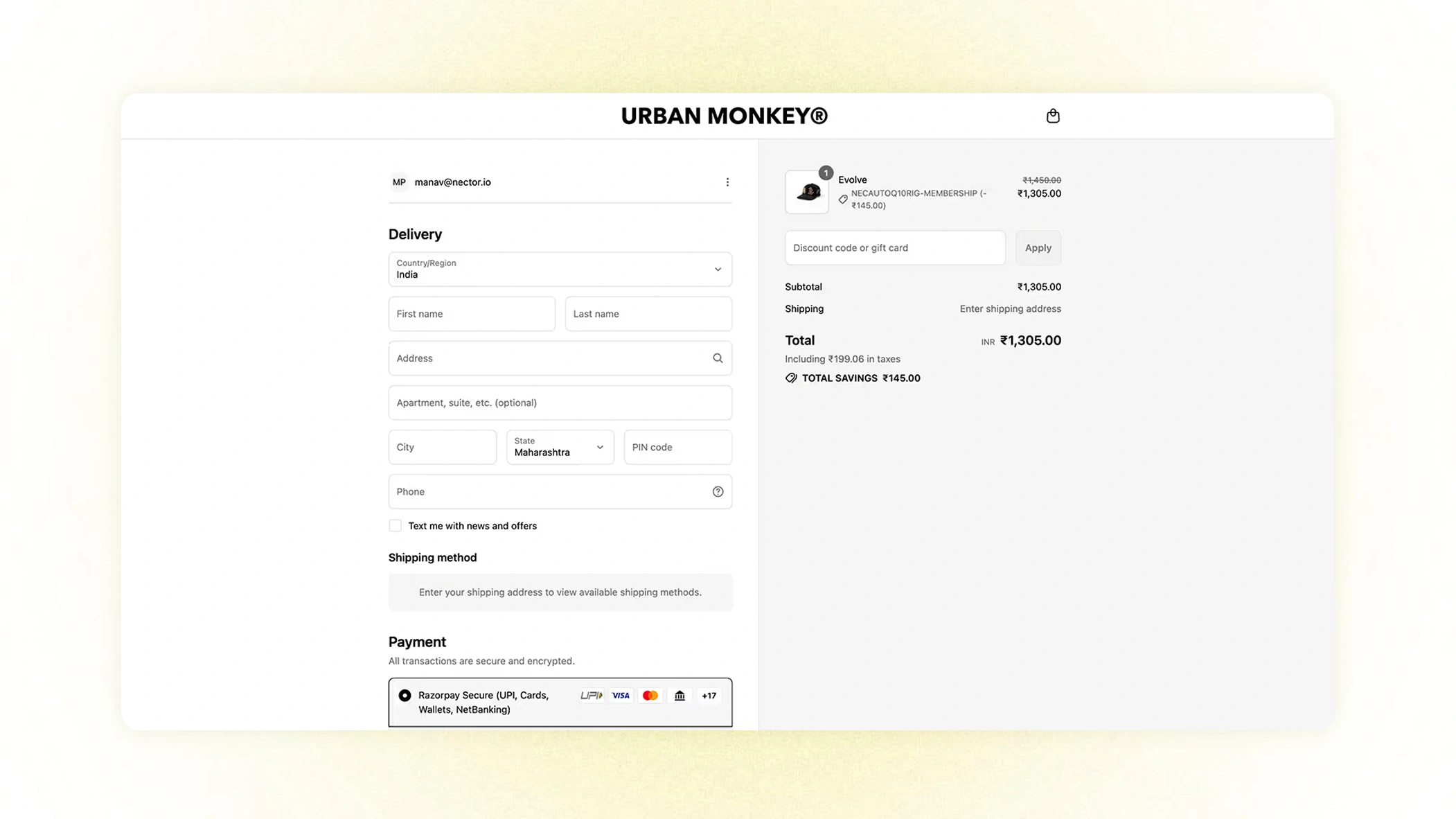
3. Seamless Experience: The member discount flows automatically from product pages through cart and checkout, so members never lose sight of their benefits or question whether their perks are being applied.
4. Builds Perceived Value: Transparency about savings helps members mentally calculate their ROI: "I've already saved ₹400 this month—my membership has paid for itself!"
Strategic Benefits of Paid Membership
For Your Business:
- Predictable Revenue – Upfront membership fees create cash flow and reduce reliance on individual transactions
- Increased Customer Lifetime Value – Members shop more frequently and spend more per order
- Higher Retention Rates – Paid commitment creates psychological investment in continuing to use the membership
- Community Building – Members feel like VIPs, creating stronger brand attachment
- Competitive Moat – Membership programs increase switching costs to competitors
For Your Customers:
- Guaranteed Savings – Confidence that every purchase delivers value
- Simplified Shopping – No hunting for coupon codes or waiting for sales
- Enhanced Rewards – Accelerated loyalty earnings compound the value
- Exclusive Access – Feel like insiders with special privileges
- Budget Predictability – Know exactly what discounts to expect
Implementation Best Practices
- Price Strategically: Set membership fees that pay for themselves after 2-3 average purchases
- Communicate Value Clearly: Show potential members exactly how much they'll save
- Make Benefits Visible: Use the Custom Price Widget everywhere to constantly reinforce value
- Create Tiers: Consider offering multiple membership levels (Basic, Premium, VIP) for different customer segments
- Auto-Renewal Options: Offer seamless renewals with reminders before expiration
- Trial Periods: Consider offering a 30-day trial to reduce signup friction
Example Membership Structure
Silver Membership - ₹299/6 months
- 10% off all orders
- 1.5x loyalty coins
- Free shipping on orders over ₹999
Gold Membership - ₹499/year
- 15% off all orders
- 2x loyalty coins
- Free shipping on all orders
- Early access to sales
- Quarterly surprise gift
By combining Paid Membership with the Custom Price Widget, you create a powerful ecosystem that drives both immediate revenue and long-term customer loyalty—transforming casual browsers into committed brand advocates.
Cart Page Widget
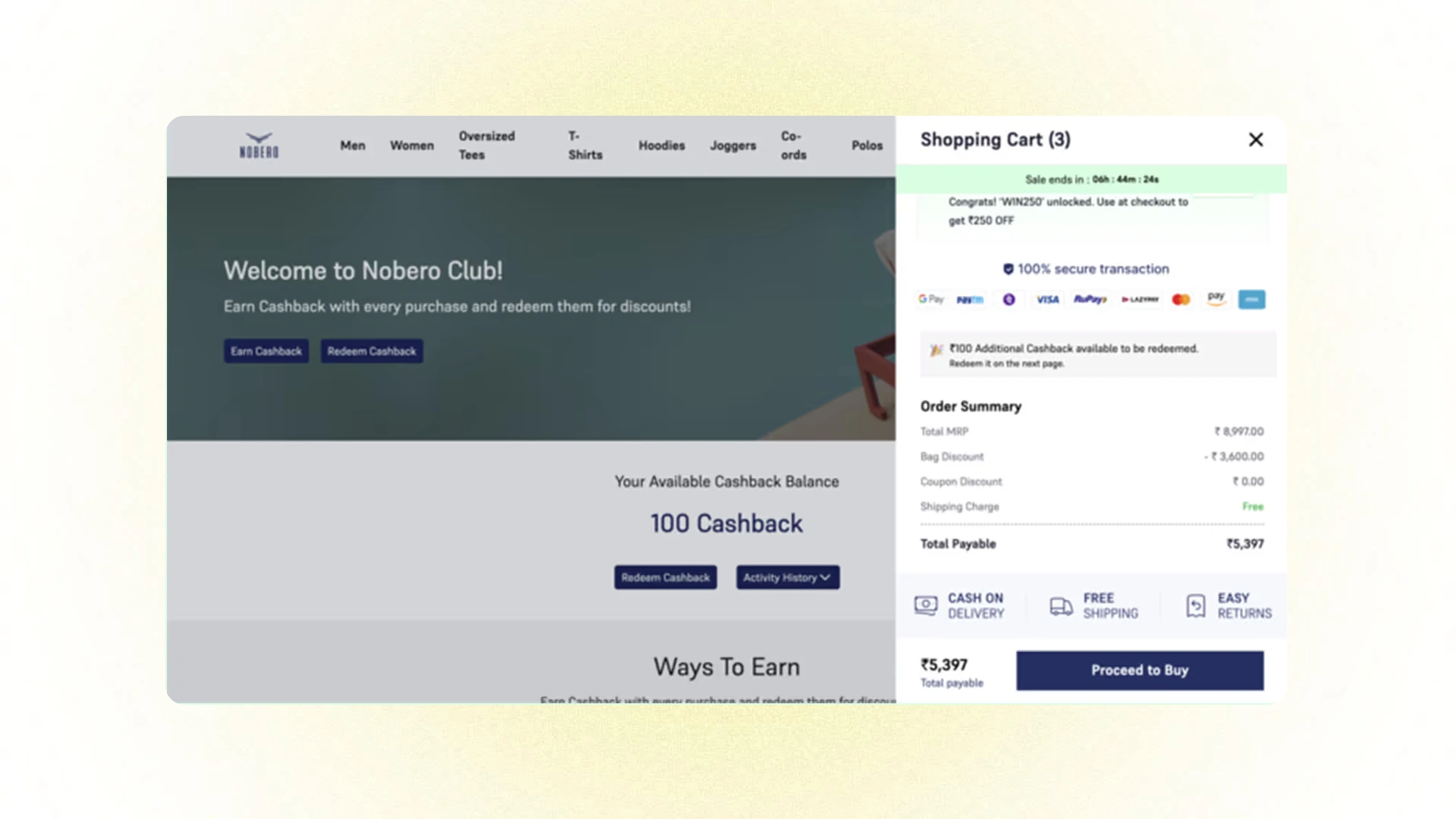
Reduce cart abandonment and boost loyalty engagement with a strategic widget that highlights redemption opportunities right when customers are ready to buy. The Cart Page Widget transforms the shopping cart from a simple checkout step into an active loyalty touchpoint that motivates immediate action.
What It Does
The Cart Page Widget appears for logged-in customers on their shopping cart page, displaying their available loyalty points and showing exactly how much they can save by redeeming them on their current purchase.
How It Works
Strategic Placement: The widget appears prominently on the cart page—the critical decision point where customers evaluate their total cost and decide whether to complete their purchase.
Key Information Displayed:
- Available Points Balance – Shows customers exactly how many loyalty coins or points they have
- Equivalent Discount Value – Translates points into tangible savings (e.g., "Your 500 points = ₹50 off")
- Redemption Call-to-Action – Clear button or toggle to apply points to the current order
- Potential Savings Preview – Updated cart total showing the price after point redemption
Example Display:
You have 850 loyalty points!
Use them now and save ₹85 on this order.
[Apply Points to Order]
Why This Placement Is Strategic
1. Timing Is Everything: The cart page is where customers make their final purchase decision. Seeing available savings at this exact moment can:
- Overcome price objections that might cause abandonment
- Provide the final nudge needed to complete the purchase
- Make the total price feel more palatable
2. Creates Urgency: Displaying available points creates a "use it now" mentality. Customers think: "I've already earned these rewards—why not use them?"
3. Reduces Friction: Rather than customers having to navigate to their account to check points, the information comes to them at the perfect moment, removing barriers to redemption.
4. Increases Perceived Value: Seeing their accumulated points translated into real monetary savings reinforces the value of participating in your loyalty program.
The Benefits
For Conversion:
- Reduces Cart Abandonment – Unexpected savings can tip hesitant shoppers toward completing their purchase
- Increases Order Completion Rate – The ability to reduce total cost addresses price-based objections
- Lowers Effective Price Sensitivity – Customers focus on the discounted total rather than the original price
Credit Wallet
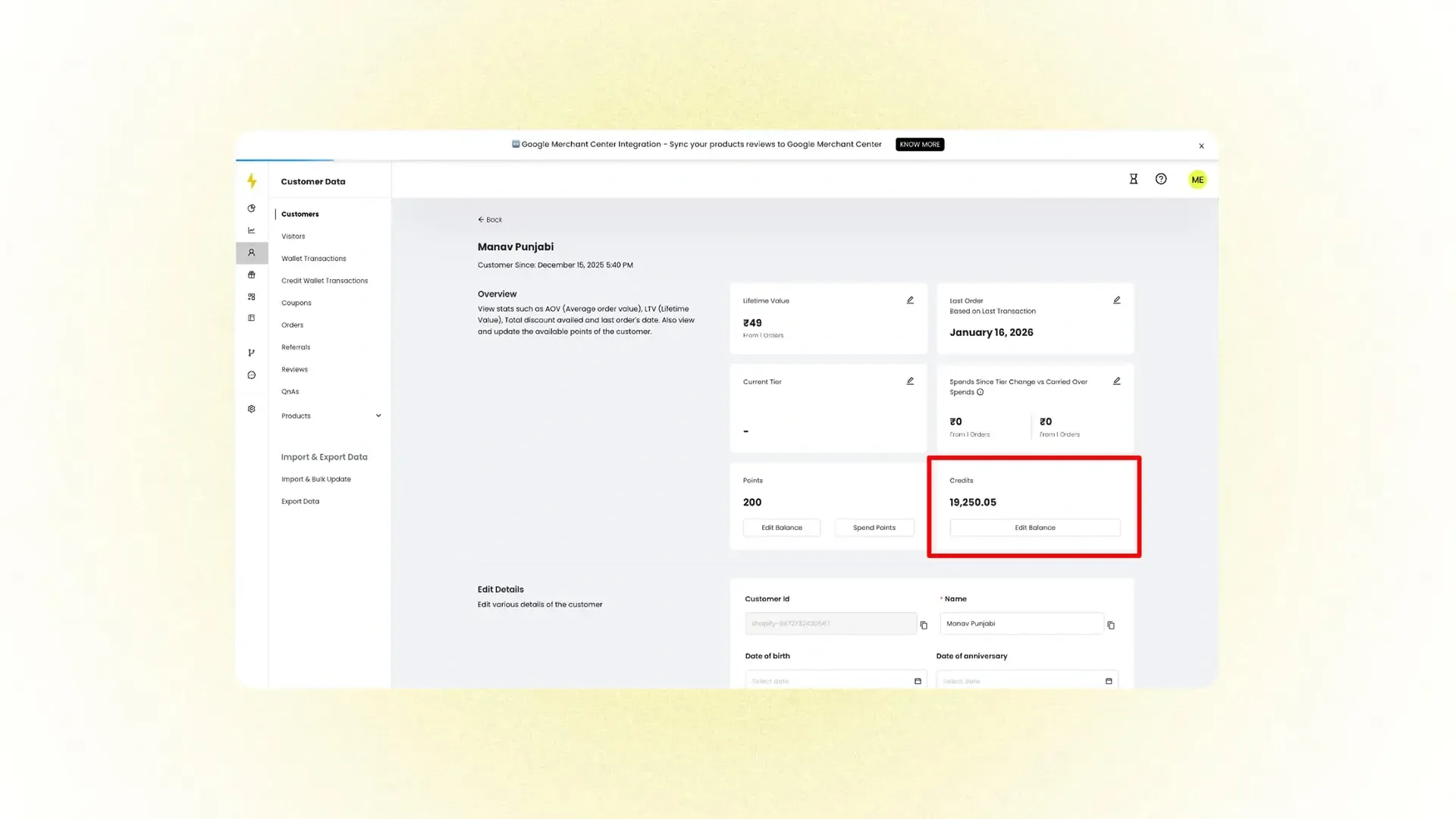
The Credit Wallet is a distinct wallet from the loyalty wallet, designed to store credits that customers can use freely. Each credit = ₹1, with no restrictions on usage—customers can redeem the full balance anytime.
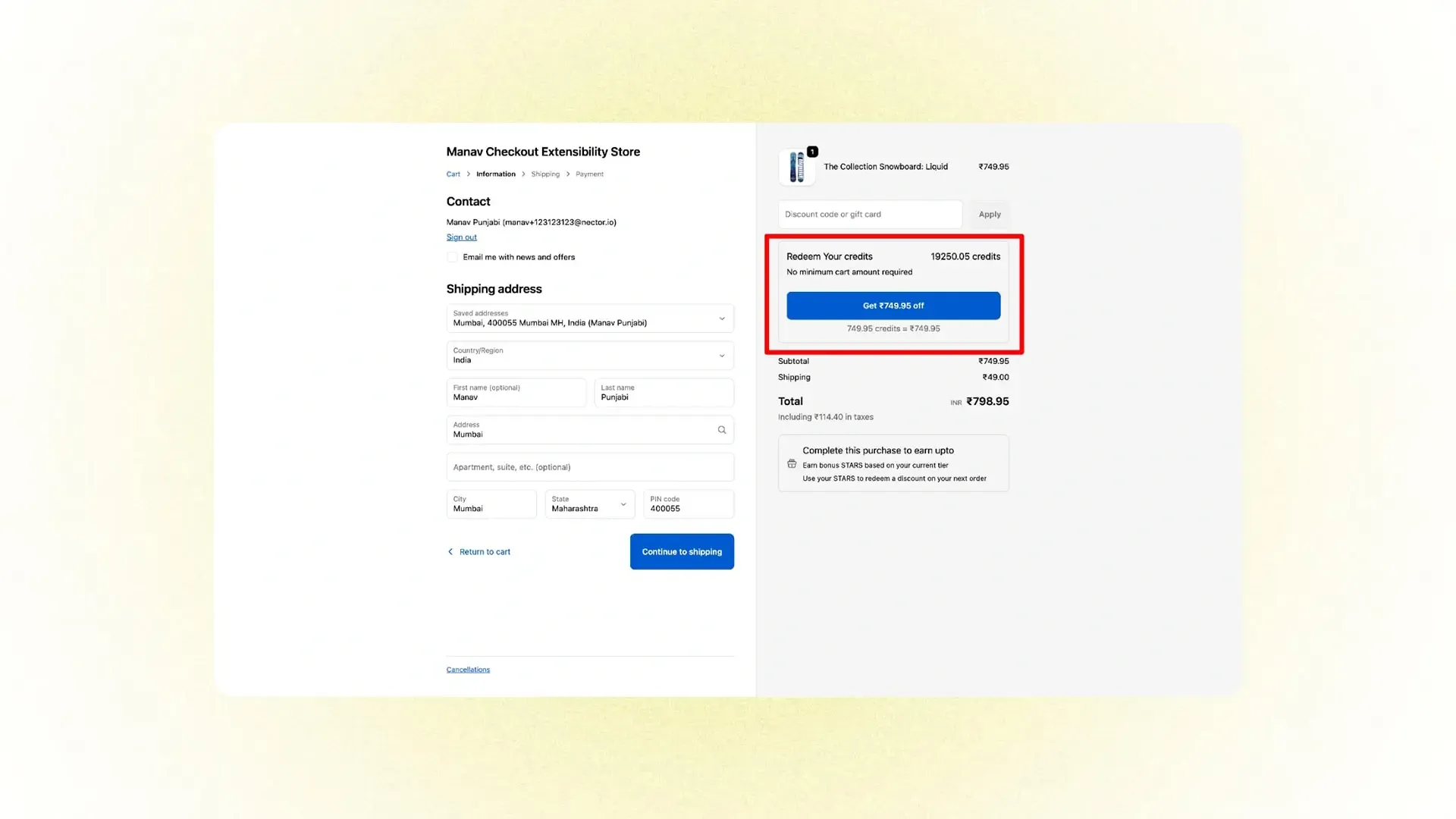
Use Cases
- Refund order returns/cancellations into the wallet instead of a bank account (e.g., Beyoung, Bonkers).
- Redeem gift card balances in the wallet for checkout (e.g., Boat).
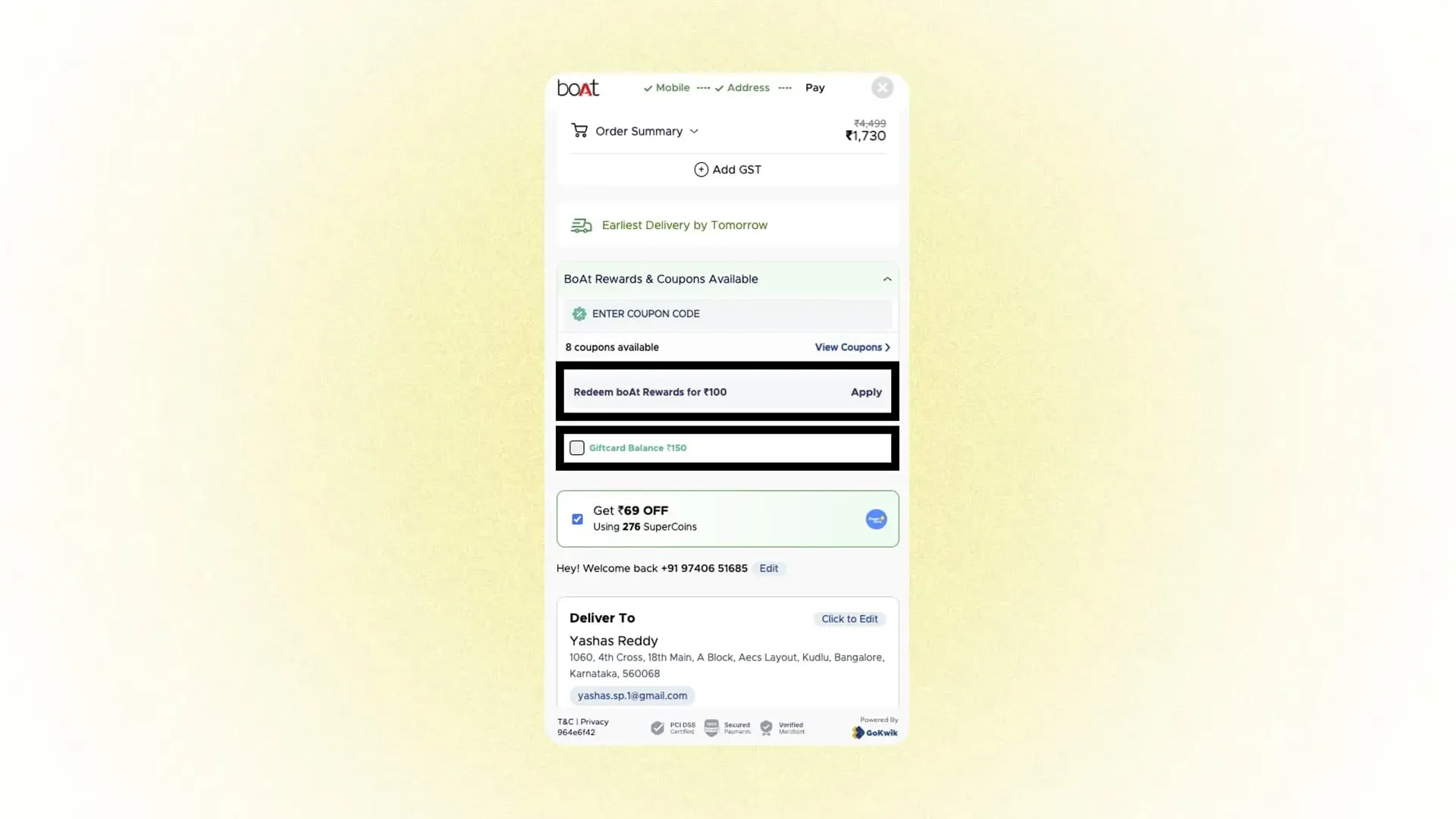
Integrations
- Gokwik Checkout: Supports redemption of both loyalty points and credits (simultaneously).
- Works with Point Redemption on PDP and Point Redemption at Checkout widgets (currently, merchants can enable either loyalty points or credits at a time).
Platforms
- Shopify:
- Return Prime integration refunds directly into the credit wallet.
- Gokwik Checkout allows credit redemption.
- Custom Websites: Full integration possible via Nector APIs.
Extra Points on Scanning
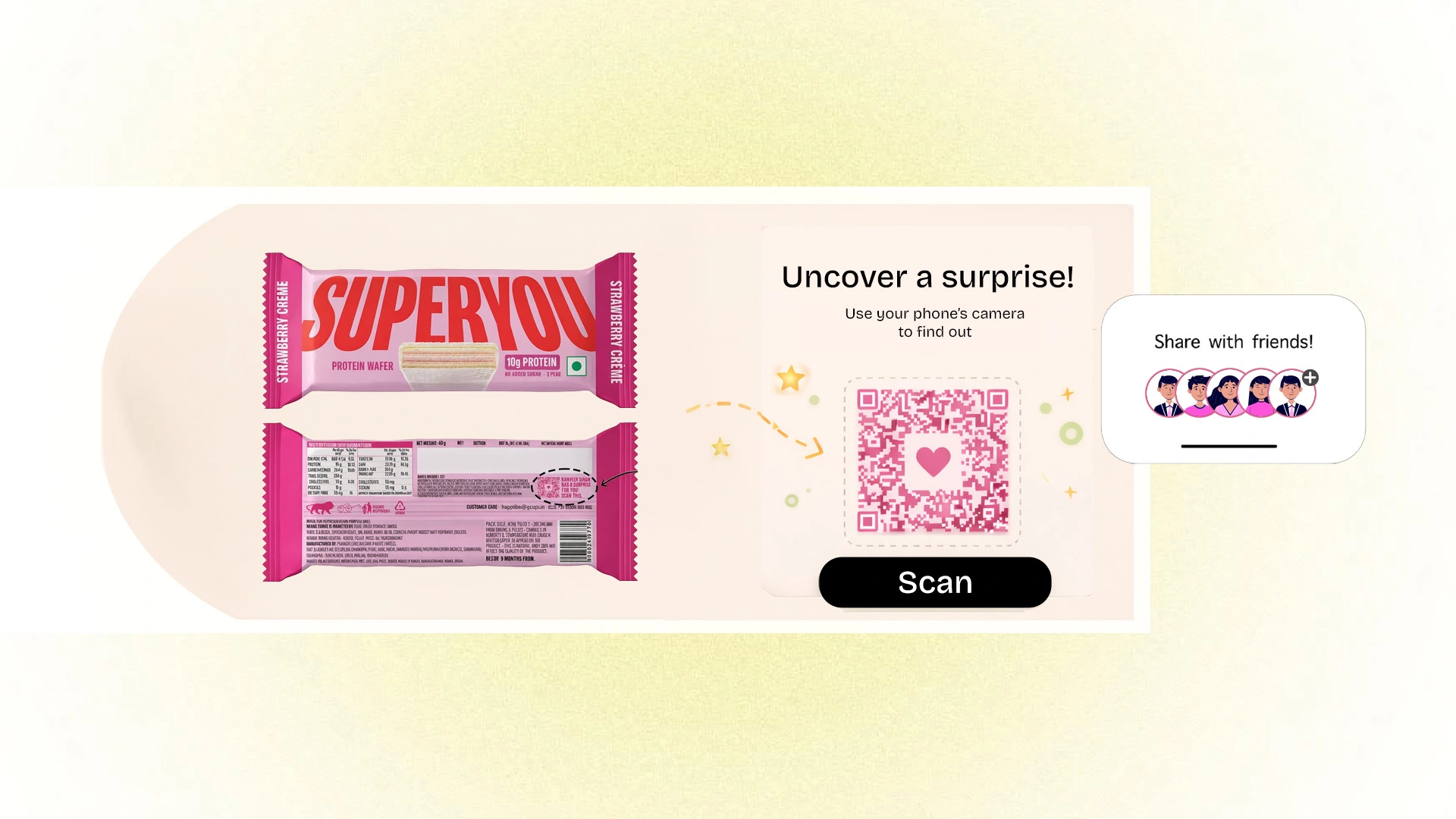
Bridge the gap between physical products and digital loyalty with QR code-powered reward activation. This innovative feature transforms your product packaging into an interactive touchpoint that drives engagement, tracks customer behavior, and seamlessly connects offline purchases to your online loyalty ecosystem.
How It Works: Real-World Example
Superyou, a protein food and nutrition brand, embeds QR codes directly on their product packaging. When customers scan these codes with their smartphone, they're instantly directed to a Nector-powered rewards page where they can claim exclusive points and benefits.
The Customer Experience:
- Customer purchases a product in-store or receives it via delivery
- Notices QR code on packaging with compelling call-to-action
- Scans code with smartphone camera
- Lands directly on personalized rewards page
- Instantly earns bonus loyalty points for scanning
- Discovers additional exclusive offers and program benefits
The Dual Power of Scan-Based Rewards
1. Tracks Customer Origin & Engagement
Every scan provides valuable data intelligence:
- Geographic Insights – Identify which retail locations, cities, or regions drive the most engagement
- Channel Performance – Understand whether customers are scanning from retail shelves, events, trade shows, or shared promotional materials
- Campaign Attribution – Track which specific marketing initiatives or product placements generate scans
- Behavioral Patterns – Analyze when and where customers interact with your products post-purchase
- Distribution Effectiveness – Measure the real-world performance of different retail partners and channels
This data transforms physical products into measurable marketing assets, providing insights previously available only through digital channels.
2. Bridges Offline to Online Seamlessly
The QR code creates a powerful connection between physical and digital experiences:
For Customers:
- Instant Gratification – Immediate reward for scanning creates positive reinforcement
- Easy Onboarding – Scanning introduces non-digital customers to your online loyalty program
- Enhanced Product Value – Physical purchase unlocks additional digital benefits
- Continued Engagement – The scan is just the beginning of an ongoing digital relationship
For Your Brand:
- Captures Retail Purchases – Loyalty programs typically miss offline transactions; QR codes close this gap
- Builds Digital Relationship – Converts one-time retail buyers into online community members
- Extends Product Lifecycle – Engagement continues long after the physical product is consumed
- Omnichannel Unity – Creates a cohesive experience across all customer touchpoints
Extra Points on Scanning transforms static packaging into an interactive loyalty touchpoint. By rewarding customers for a simple scan, you capture valuable engagement data, connect offline purchases to your digital ecosystem, and create an additional reason for customers to choose your brand over competitors. It's not just about the points; it's about building a bridge between the physical and digital worlds that strengthens customer relationships at every touchpoint.
Shopify POS Integration
Refer to the demo video for the full flow.
With Shopify POS Integration, customers can use their loyalty points not just online, but also at offline retail stores.
How it Works
- The POS operator checks the customer’s loyalty points balance directly on the Shopify POS device.
- Eligible discounts can be applied instantly at checkout using Nector’s POS widgets.
- Provides a seamless omnichannel loyalty experience across online and offline shopping.
Referral Leaderboard
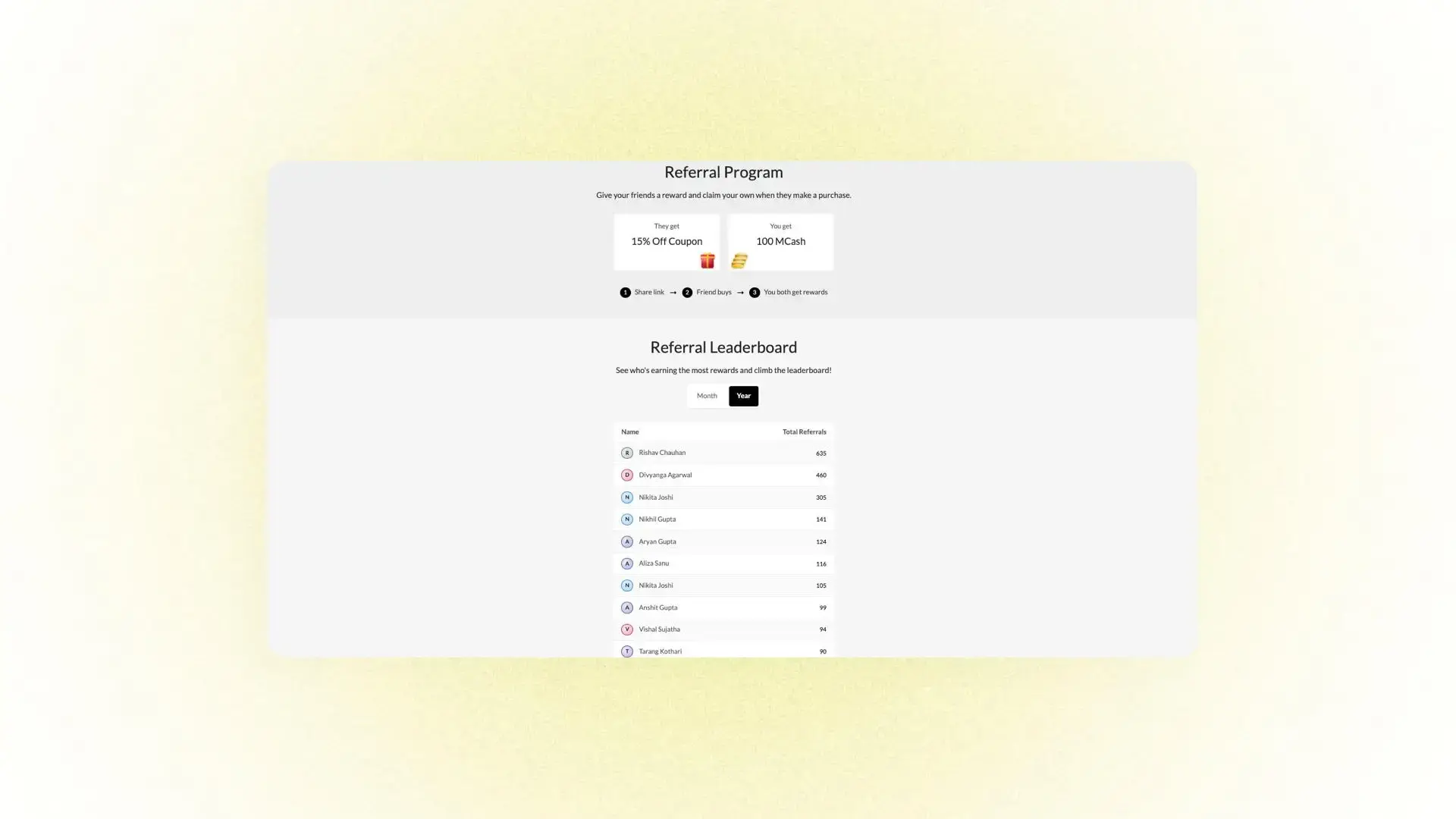
Turn your customers into your best marketers with a live referral competition.
With Nector’s Referral Leaderboard, brands can run high-impact campaigns where customers earn rewards by referring friends, driving purchases, and climbing the ranks in real time.
How It Works
- Customers share their referral link
- Every successful referral earns points
- A live leaderboard updates automatically
- Top referrers win exciting rewards
Why Brands Love It
- Boost referrals during key sales periods
- Keep customers engaged with gamified rewards
- Drive repeat purchases and higher participation
- Run campaigns without manual tracking
Real Example
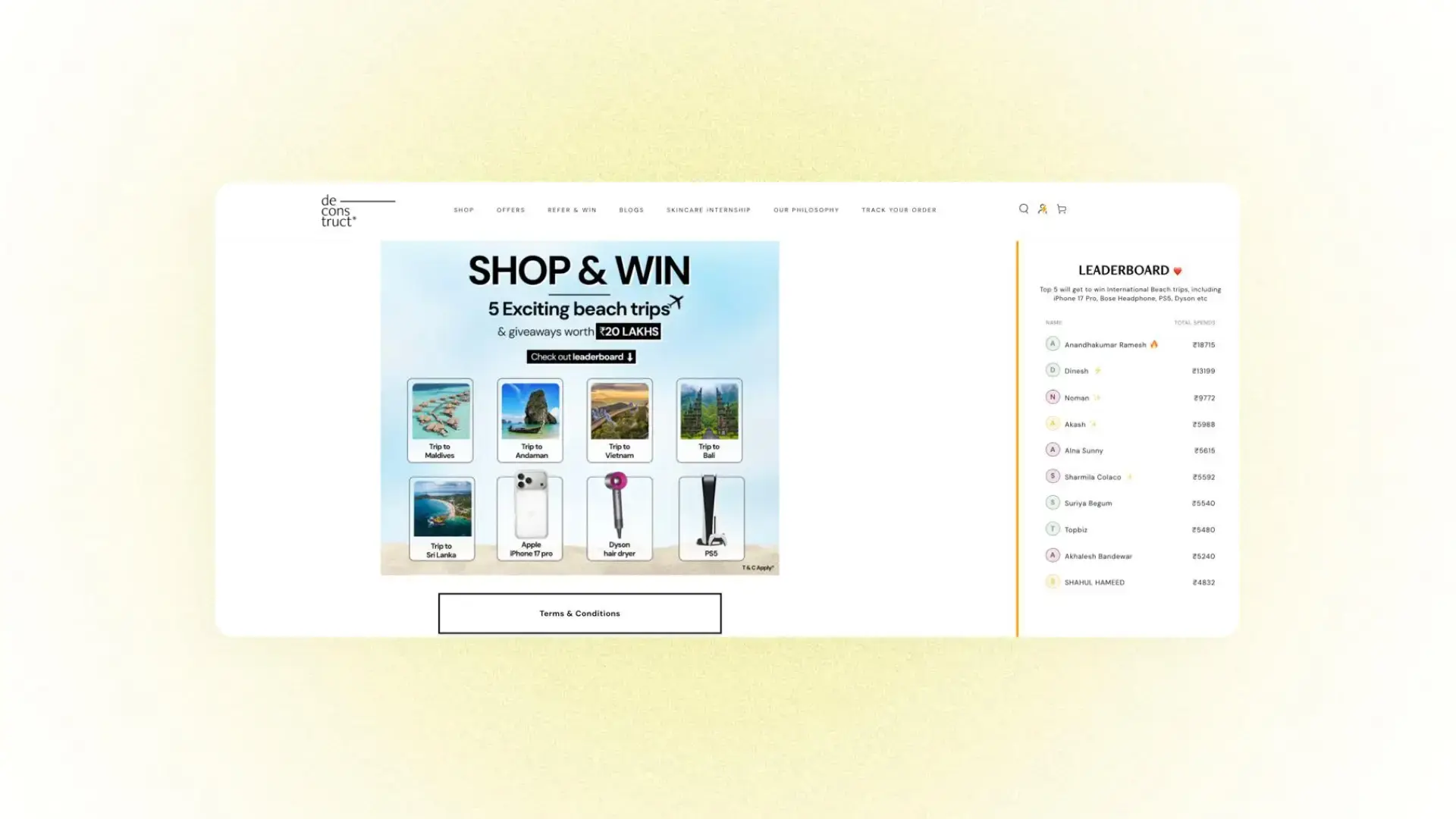
Deconstruct ran a birthday referral leaderboard where top customers won beach vacations, daily giveaways, and exclusive prizes, powered by a live rewards engine.
When the reward is worth it, customers move fast.
Best Use Cases
- Product launches
- Festival & birthday sales
- Influencer-style customer challenges
- Community-driven growth campaigns
Now Available in Nector
Referral Leaderboards are now available to all merchants using Nector’s rewards & referral program directly on your existing referral and rewards pages.
Reward Redemption
How you set up redemption shapes your customers' experience with your loyalty program. Nector supports two redemption models; pick what fits your brand, or combine both.
Product-Based Redemption
Customers earn points and redeem them for specific rewards — discounts, products, or experiences. Every reward has a clear point value, so customers always know what they're working toward.
Real Example
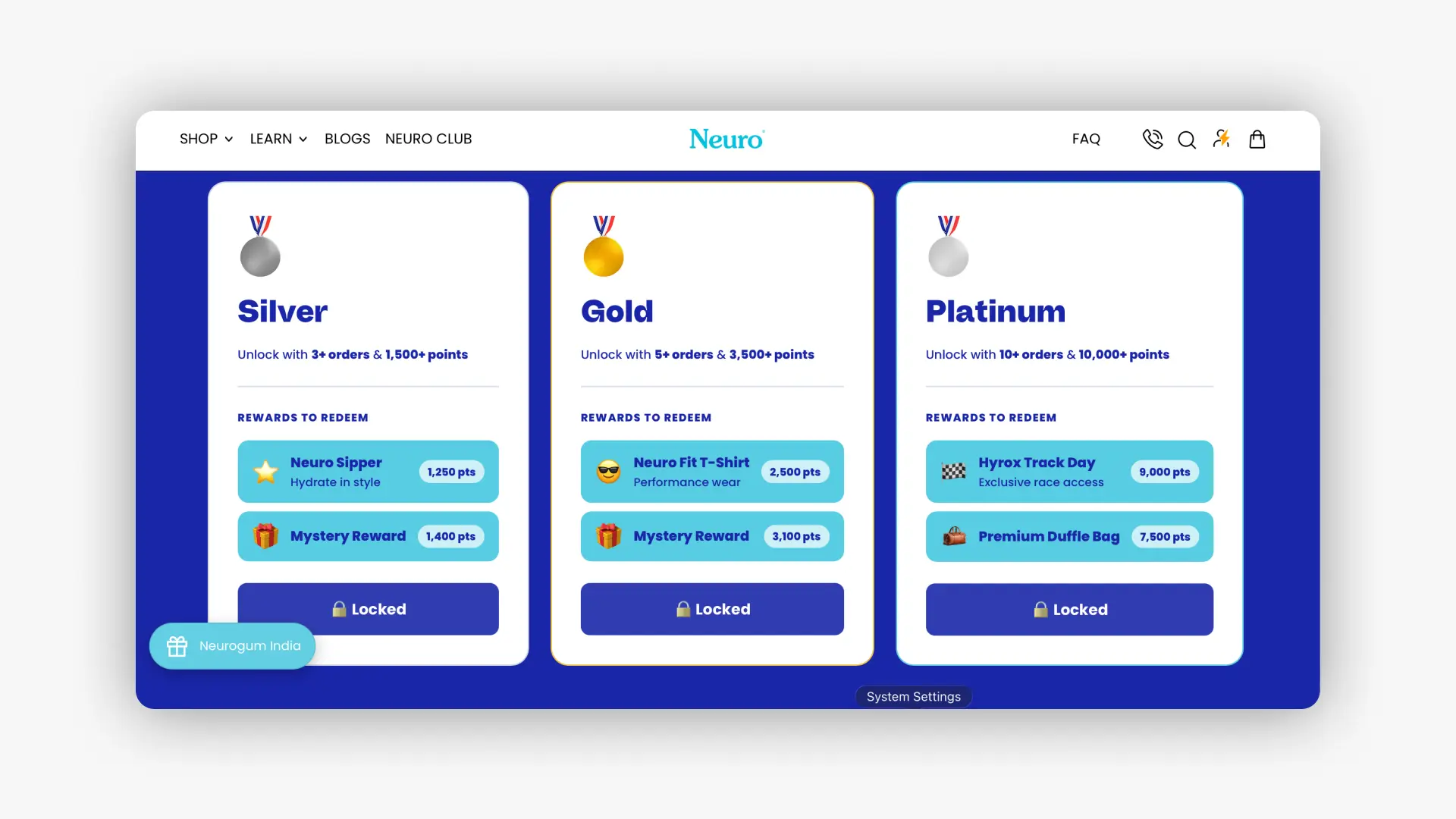
Neurogum India runs its NeuroClub program on Nector. Customers earn 1 Neuro Point for every ₹1 spent and redeem points for rewards across all product categories — gums, mints, and sachets.
Rewards to redeem:
- Flat 25% off — 1,250 pts
- Mystery Rewards (high-value discount) — 1,400 pts
- Flat 30% off — 2,500 pts
- Mystery Reward (exclusive member drop) — 3,100 pts
- Hyrox Track Day (exclusive race access) — 9,000 pts
- Premium Duffle Bag (limited edition gear) — 7,500 pts
What makes it work:
- Points can be redeemed across all product categories — no restrictions
- Rewards go beyond discounts at higher point values, giving customers real goals to aim for
- Points never expire, so customers stay in the program on their own timeline
Service-Based Redemption
Customers earn cashback that works like real money at checkout. No point conversion, no restrictions, just straightforward value on every order.
Real Example:
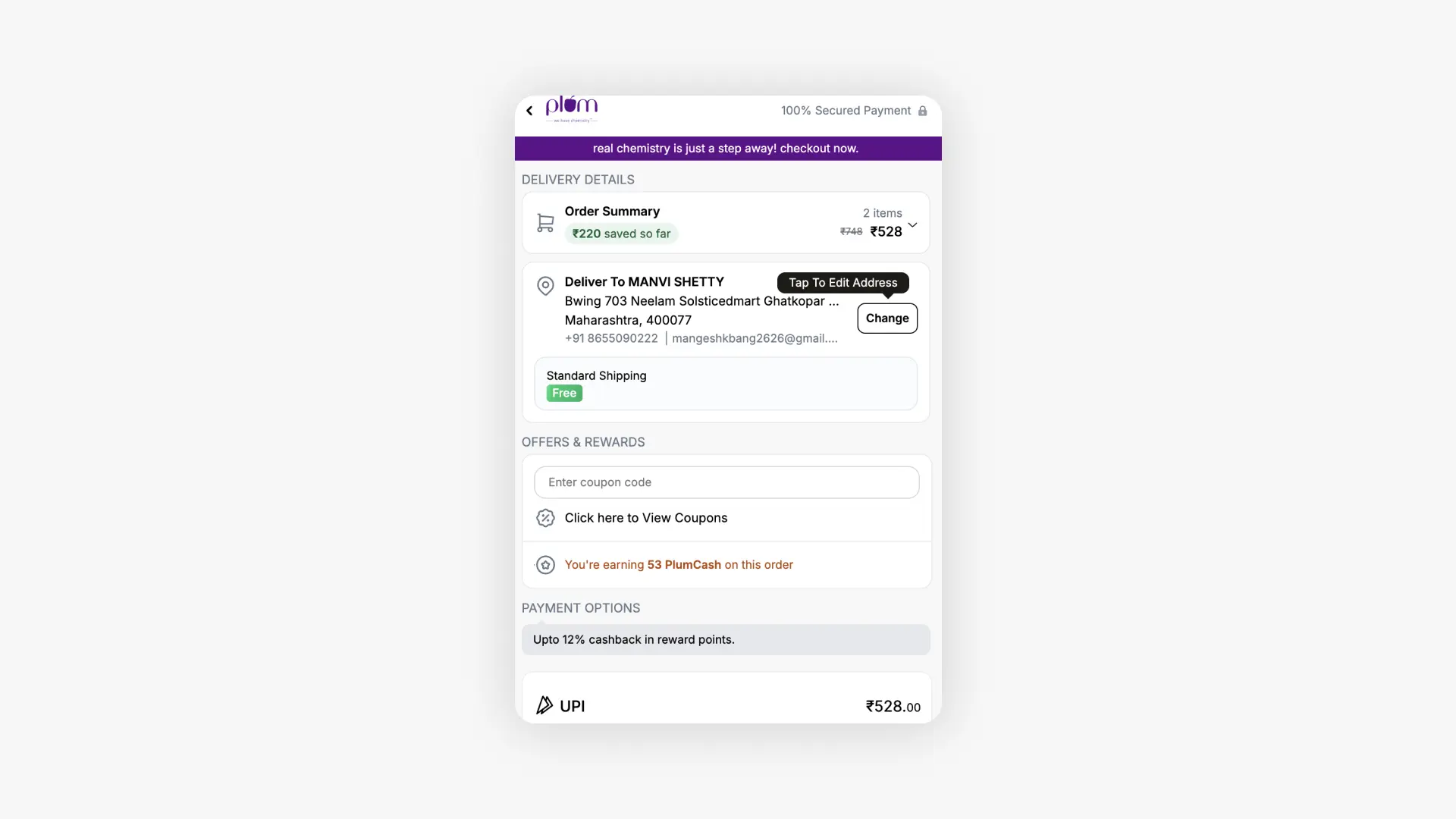
Plum Goodness runs its Plum+ program on Nector using PlumCash — where ₹1 of PlumCash = ₹1 off at checkout, on any order, across any category.
How customers earn PlumCash:
- Every purchase — cashback credited on each order
- Writing a review — ₹50 worth of PlumCash per review
- Birthday month — bonus PlumCash credited automatically
- Plum Plus Fridays — boosted cashback on special earn events
How customers redeem:
- Applied directly at checkout like a wallet balance
- Works across skincare, haircare, bodycare, and fragrances, no category limits
- Valid for 1 year with at least 2 transactions in that period
- ₹1 PlumCash = ₹1 off, no conversion needed
What makes it work:
- Customers understand the value instantly; it spends like cash
- No restrictions mean customers never feel limited in how they use their rewards
- Reviews feed directly into the earn loop, making UGC a natural part of the program
Both models are available on Nector and can be used together depending on what works best for your customers. Connect with nector to understand both.
